
Free Transform
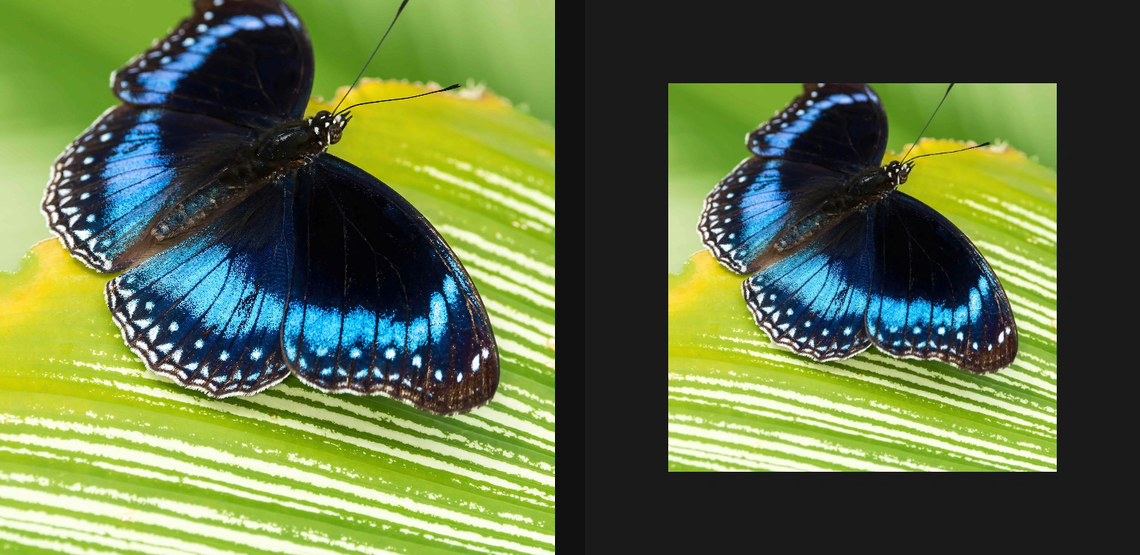
Move, scale, rotate, skew, perspective-warp, or flip the full running image through one transform layer.
Add Free Transform
Open an image or build the source composition first. Put this effect after the content it should process in stack processing order. Choose Transform → Free Transform in the effects picker, or search for Free Transform with Cmd/Ctrl + F. Select the new layer in Layers to open its Effect Panel.
Place the composition
Use Transform position, Scale, Rotate and Anchor, or drag the on-canvas gizmo. Lock Aspect keeps scaling proportional.
Warp and fill edges
Use Skew for shear and Perspective corners for a four-corner warp. Choose Fill for newly exposed areas and Sampling for smooth interpolation or hard pixel edges. Flip Horizontal or Vertical when needed.
Compare and finish
Toggle the layer eye to compare with the incoming composition. Use the Effect Panel footer for opacity and blend mode, or add a mask to limit the affected area. In Video or Live, use the function menu on a supported control to add keyframes or a driver.
Control reference
Show individual controls
| Control | What it does | Values and animation |
|---|---|---|
| Fill | Chooses how transformed samples outside the source are filled. | Transparent / Clamp / Mirror / Tile Default: Transparent Not keyframeable |
| Horizontal | Reflects the source from left to right. | On / Off Default: Off Discrete keyframes |
| Vertical | Reflects the source from top to bottom. | On / Off Default: Off Discrete keyframes |
| Sampling | Chooses how source pixels are sampled when the layer is resized or warped. | Bilinear / Nearest Default: Bilinear Not keyframeable |
| Lock Aspect | Keeps X and Y scale linked while resizing. | On / Off Default: Off Not keyframeable |
| Perspective Bl X | Moves the bottom-left perspective corner horizontally. | -1 to 2 Default: 0 Continuous keyframes |
| Perspective Bl Y | Moves the bottom-left perspective corner vertically. | -1 to 2 Default: 1 Continuous keyframes |
| Perspective Br X | Moves the bottom-right perspective corner horizontally. | -1 to 2 Default: 1 Continuous keyframes |
| Perspective Br Y | Moves the bottom-right perspective corner vertically. | -1 to 2 Default: 1 Continuous keyframes |
| Perspective Tl X | Moves the top-left perspective corner horizontally. | -1 to 2 Default: 0 Continuous keyframes |
| Perspective Tl Y | Moves the top-left perspective corner vertically. | -1 to 2 Default: 0 Continuous keyframes |
| Perspective Tr X | Moves the top-right perspective corner horizontally. | -1 to 2 Default: 1 Continuous keyframes |
| Perspective Tr Y | Moves the top-right perspective corner vertically. | -1 to 2 Default: 0 Continuous keyframes |
| Skew X | Shears the layer horizontally. | -89 to 89 Default: 0 Continuous keyframes |
| Skew Y | Shears the layer vertically. | -89 to 89 Default: 0 Continuous keyframes |
| Transform / Anchor / X | Sets the horizontal anchor used for scale and rotation. | 0 to 1 Default: 0.5 Continuous keyframes |
| Transform / Anchor / Y | Sets the vertical anchor used for scale and rotation. | 0 to 1 Default: 0.5 Continuous keyframes |
| Transform / Rotate | Rotates the layer around its anchor point. | -360 to 360 Default: 0 Continuous keyframes |
| Transform / Scale / X | Scales the layer width around the anchor point. | 0.05 to 8 Default: 1 Continuous keyframes |
| Transform / Scale / Y | Scales the layer height around the anchor point. | 0.05 to 8 Default: 1 Continuous keyframes |
| Transform / Translate / X | Moves the layer horizontally in canvas space. | -2 to 3 Default: 0.5 Continuous keyframes |
| Transform / Translate / Y | Moves the layer vertically in canvas space. | -2 to 3 Default: 0.5 Continuous keyframes |