
Data Mask
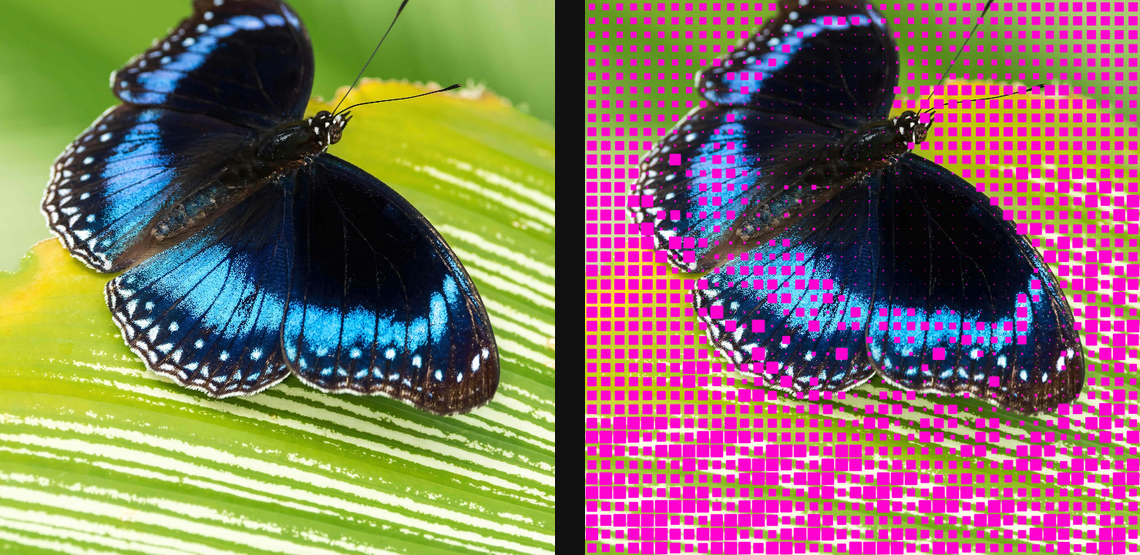
Generate data-like mask bands and blocks from source tone for technical overlays and compositing mattes.
Add Data Mask
Open an image or build the source composition first. Put this effect after the content it should process in stack processing order. Choose Texture & Pattern → Digital → Data Mask in the effects picker, or search for Data Mask with Cmd/Ctrl + F. Select the new layer in Layers to open its Effect Panel.
Choose the pattern
Set Pattern and Source, then adjust Scale and Angle to place the marks. Use Offset X and Offset Y to align them.
Map the source
Adjust Power and Smoothness to change how source values become coverage. Choose foreground and background colours, and use Invert to reverse the pattern relationship.
Set an individual colour
Click the relevant colour swatch to open its picker. Colors and Palettes explains colour values, transparency and the canvas sampling controls where available.
Compare and finish
Toggle the layer eye to compare with the incoming composition. Use the Effect Panel footer for opacity and blend mode, or add a mask to limit the affected area. In Video or Live, use the function menu on a supported control to add keyframes or a driver.
Control reference
Show individual controls
| Control | What it does | Values and animation |
|---|---|---|
| Angle | rotation of the mask grid | 0° to 360° Default: 0° Continuous keyframes |
| Background | Source keeps the image behind marks; Paper replaces the background | Source / Paper Default: Paper Discrete keyframes |
| Foreground | Ink uses a custom colour; Source carries sampled image colour | Ink / Source Default: Source Discrete keyframes |
| Ink | custom foreground colour for the generated marks | Colour Default: #e8e9e4 Colour keyframes |
| Invert | invert the source value before it drives mark size | On / Off Default: Off Discrete keyframes |
| Data Mask Offset X | horizontal grid offset measured in cells | -2 to 2 Default: 0 Continuous keyframes |
| Data Mask Offset Y | vertical grid offset measured in cells | -2 to 2 Default: 0 Continuous keyframes |
| Paper | background colour when Background is Paper | Colour Default: #101218 Colour keyframes |
| Pattern | form drawn in each source-keyed cell | Blocks / Dots / Stripes / Diamonds Default: Blocks Discrete keyframes |
| Power | tone curve; higher values reserve marks for stronger source values | 0.05 to 8 Default: 0.85 Continuous keyframes |
| Rounding | corner radius for block forms | 0% to 100% Default: 10% Continuous keyframes |
| Scale | cell pitch; smaller values create denser mask graphics | 0 to 20 %; 1 to 500 px (typed input: 1 to 2000) Default: 1.6 % Continuous keyframes |
| Smoothness | edge softness of each generated mark | 0% to 50% Default: 2.5% Continuous keyframes |
| Source | image channel that grows or shrinks each form | Luminance / Alpha Default: Luminance Discrete keyframes |