
Shape Grid
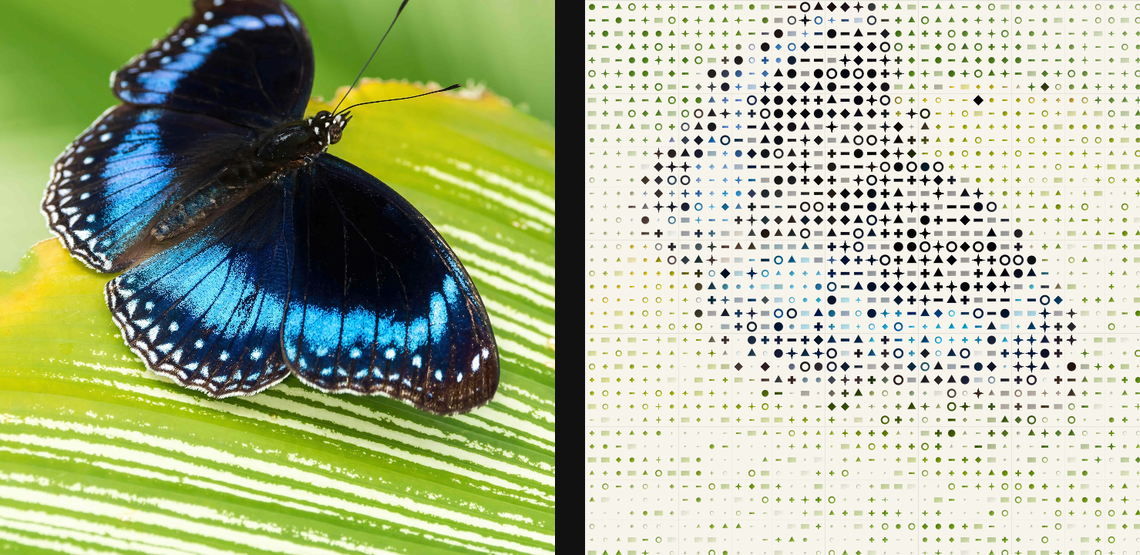
Fill a grid with source-keyed symbols, relief, and colour for modular graphic patterning.
Add Shape Grid
Open an image or build the source composition first. Put this effect after the content it should process in stack processing order. Choose Texture & Pattern → Digital → Shape Grid in the effects picker, or search for Shape Grid with Cmd/Ctrl + F. Select the new layer in Layers to open its Effect Panel.
Build the cell layout
Set Cell Size, Gap and Shapes, then choose Mode and Density for how each cell is filled.
Style the surface
Set Ink and Paper, then use Height and Light Angle if you want raised symbols. Adjust Angle to rotate the field and inspect small cells at full preview quality.
Set an individual colour
Click the relevant colour swatch to open its picker. Colors and Palettes explains colour values, transparency and the canvas sampling controls where available.
Compare and finish
Toggle the layer eye to compare with the incoming composition. Use the Effect Panel footer for opacity and blend mode, or add a mask to limit the affected area. In Video or Live, use the function menu on a supported control to add keyframes or a driver.
Control reference
Show individual controls
| Control | What it does | Values and animation |
|---|---|---|
| Ink | mono ink colour for the symbols | Colour Default: #141414 Colour keyframes |
| Paper | paper/background colour behind the symbols | Colour Default: #edf0f2 Colour keyframes |
| Angle | rotation of the symbol grid | 0° to 360° Default: 0° Continuous keyframes |
| Cell Size | cell pitch; smaller values create denser symbol fields | 0 to 20 %; 1 to 500 px (typed input: 1 to 2000) Default: 1.8 % Continuous keyframes |
| Mode | Source carries sampled image colour; Mono uses ink on paper | Source / Mono Default: Source Discrete keyframes |
| Density | how strongly source luminance grows each symbol | 0 to 1.5 Default: 1.35 Continuous keyframes |
| Gap | empty margin inside each cell | 0% to 70% Default: 6% Continuous keyframes |
| Shape Light Angle | direction of the key light over the raised symbols | 0 to 360 Default: 135 Continuous keyframes |
| Height | height of the virtual ink/symbol surface | 0 to 1 Default: 0 Continuous keyframes |
| Shapes | symbol family used for the grid cells | Mixed / Dots / Crosses / Lines / Diamonds / Dominoes / Rings / Triangles / Sparkles Default: Crosses Discrete keyframes |