
16-bit Grid
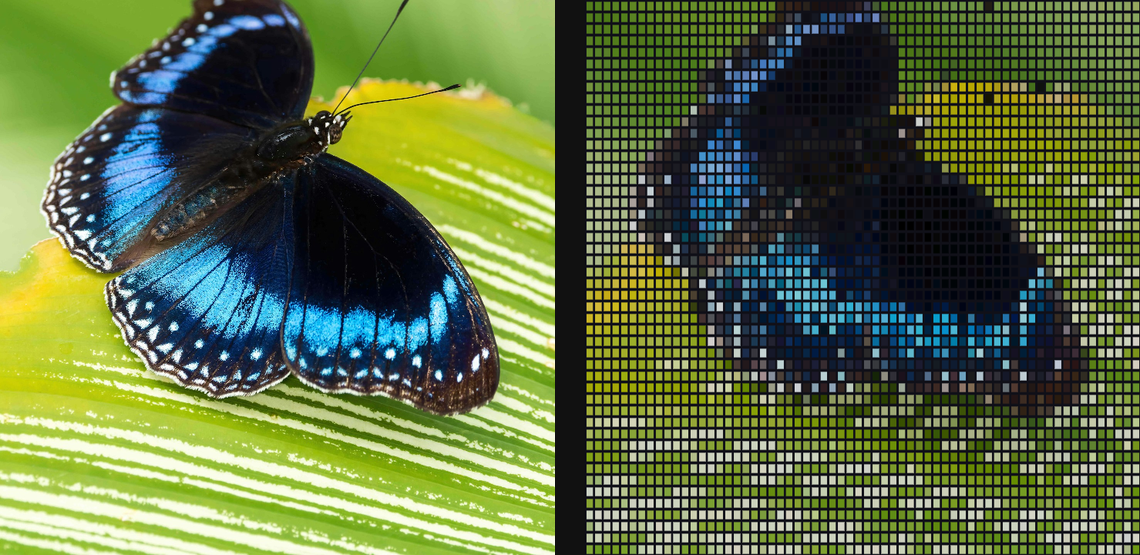
Overlay stepped low-bit tiles, highlights, and grid structure inspired by 16-bit game surfaces.
Add 16-bit Grid
Open an image or build the source composition first. Put this effect after the content it should process in stack processing order. Choose Texture & Pattern → Pixel → 16-bit Grid in the effects picker, or search for 16-bit Grid with Cmd/Ctrl + F. Select the new layer in Layers to open its Effect Panel.
Choose the grid
Set Rows and Columns for the tile layout, then Levels and Quantize for the tonal steps.
Add relief or keep it flat
Increase Height and adjust Light Angle for a raised grid. Use Edge and Anti-alias Edges to change the cell boundaries. Inspect the result at full quality.
Set an individual colour
Click the relevant colour swatch to open its picker. Colors and Palettes explains colour values, transparency and the canvas sampling controls where available.
Compare and finish
Toggle the layer eye to compare with the incoming composition. Use the Effect Panel footer for opacity and blend mode, or add a mask to limit the affected area. In Video or Live, use the function menu on a supported control to add keyframes or a driver.
Control reference
Show individual controls
| Control | What it does | Values and animation |
|---|---|---|
| Anti-alias Edges | smooth the grid edges by about one pixel | On / Off Default: On Discrete keyframes |
| Columns | horizontal cell count; higher values make a finer grid | 2 to 256 Default: 64 Discrete keyframes |
| Edge | colour of the grid/edge lines | Colour Default: #101018 Colour keyframes |
| Levels | uniform colour steps per channel in Levels mode | 2 to 64 Default: 8 Discrete keyframes |
| Bit Grid Light Angle | direction of the key light over the raised grid | 0 to 360 Default: 135 Continuous keyframes |
| Quantize | colour reduction applied to each sampled cell | RGB565 / Levels / None Default: RGB565 Discrete keyframes |
| Height | height of the subtle raised-cell lighting | 0 to 1 Default: 0.18 Continuous keyframes |
| Rows | vertical cell count; higher values make a finer grid | 2 to 256 Default: 48 Discrete keyframes |
| Edge | width of the drawn grid edge inside each cell | 0% to 45% Default: 8% Continuous keyframes |