
Fusion
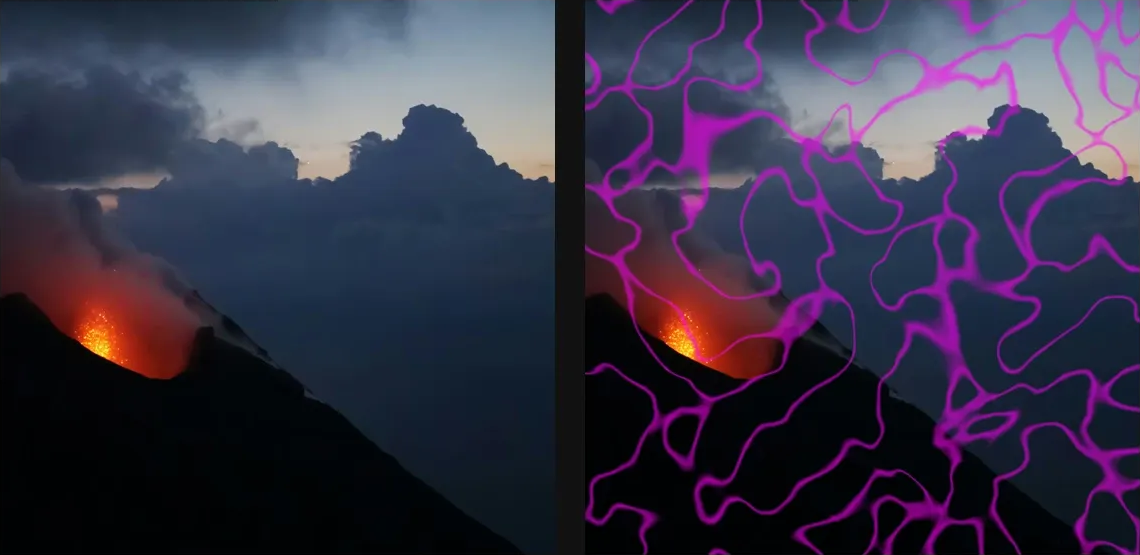
Generate liquid cellular veils, membranes, plasma bands, and flowing source-reactive masks.
Add Fusion
Open an image or build the source composition first. Put this effect after the content it should process in stack processing order. Choose Material → Liquid → Fusion in the effects picker, or search for Fusion with Cmd/Ctrl + F. Select the new layer in Layers to open its Effect Panel.
Choose the liquid structure
Select Mode and set Cell Size, Variation and Image Pull. Adjust Cohesion and Vein Tightness to form membranes or flowing bands.
Shape and colour
Use Stretch and Stretch Angle for direction, Detail for finer structure, and Palette or Stops for colour. Layer Spread and Edge Hardness change the layer boundaries.
Animate the field
Change Cycle to move through the pattern. Animate it in Video or Live, then tune the Material and lighting controls for surface shading.
Edit the shared palette
Set Output → Mode to False Colour to show Palette. Colors and Palettes explains adding and moving stops, editing colour and opacity, extracting colours and saving a palette for reuse.
Set an individual colour
Click the relevant colour swatch to open its picker. Colors and Palettes explains colour values, transparency and the canvas sampling controls where available.
Compare and finish
Toggle the layer eye to compare with the incoming composition. Use the Effect Panel footer for opacity and blend mode, or add a mask to limit the affected area. In Video or Live, use the function menu on a supported control to add keyframes or a driver.
Control reference
Show individual controls
| Control | What it does | Values and animation |
|---|---|---|
| Stretch Angle | direction of the stretch | 0° to 360° Default: 0° Continuous keyframes |
| Stretch | stretches the material along one axis | 0% to 100% Default: 0% Continuous keyframes |
| Palette | false-colour palette for the pattern | Available presets Default: verdigris Discrete keyframes |
| Tint | tint painted over the source where the pattern is high | Colour Default: #E7DDCB Colour keyframes |
| Composite Opacity | how strongly the pattern affects the source | 0% to 100% Default: 48% Continuous keyframes |
| Detail | adds fine surface texture without breaking up the larger forms | 1 to 8 Default: 2 Continuous keyframes |
| Low | low colour for Duotone output | Colour Default: #1C2C33 Colour keyframes |
| Fine Fade | fades or preserves the finest layers | 0.2 to 0.8 Default: 0.52 Continuous keyframes |
| Field Mix | balances the main forms with secondary material structure | 0% to 100% Default: 50% Continuous keyframes |
| Swirl | bends the material into curling liquid motion | 0% to 100% Default: 40% Continuous keyframes |
| Invert Colormap | Reverses the colour-palette mapping of the fused reaction field. | On / Off Default: Off Not keyframeable |
| Invert | flip light and dark in the output | On / Off Default: Off Discrete keyframes |
| Light | azimuth of the Relief light | 0° to 360° Default: 135° Continuous keyframes |
| Elevation | height of the Relief light | 0° to 90° Default: 45° Continuous keyframes |
| Intensity | strength of Relief shading | 0 to 2 Default: 1 Continuous keyframes |
| Contrast | boost weak patterns or soften hard edges | 0 to 2 Default: 1 Continuous keyframes |
| Gamma | above 1 brightens the pattern, below 1 darkens | 0.1 to 3 Default: 1 Continuous keyframes |
| Mode | how the generated pattern is applied to the source | Tint / False Colour / Mask / Edges / Displace / Relief / Contour / Duotone / Luminance Default: Tint Discrete keyframes |
| Cycle | flows the material through one seamless animation cycle | 0 to 1 Default: 0 Continuous keyframes |
| Cohesion | how tightly cells, ridges, and membranes fuse | 0% to 100% Default: 82% Continuous keyframes |
| Vein Tightness | tightens vein and ridge lines | 0.5 to 6 Default: 0.8 Continuous keyframes |
| Layer Spread | widens spacing between texture layers | 1.5 to 3 Default: 2.03 Continuous keyframes |
| Cell Size | larger values make broader cells and softer bands | 0.5 to 40 % (typed input: 0.5 to 100); 8 to 512 px (typed input: 8 to 4096) Default: 24 px Continuous keyframes |
| Variation | change for a different random pattern | 0 to 9999 Default: 0 Discrete keyframes |
| Edge Hardness | hardens or softens material edges | 0.2 to 4 Default: 1 Continuous keyframes |
| Image Pull | how strongly image brightness and edges pull the material | 0% to 100% Default: 40% Continuous keyframes |
| Stops | Editable palette stops used to colour the blended reaction patterns. | Gradient stops Default: None Not keyframeable |
| Material | material family for the generated Fusion surface | Veils / Coral / Cells / Nerve / Plasma / Bloom / Marble / Woodgrain / Magma / Caustics / Topographic Default: Veils Discrete keyframes |
| Curl Passes | number of curl-warp passes | 1 to 4 Default: 1 Discrete keyframes |
| Curl Reach | multiplies the reach of Swirl without adding smaller texture | 0 to 4 Default: 1.55 Continuous keyframes |