
Scratched Glass
Add directional micro-scratches, scuff haze, and tiny refractive glints over the image.
Add Scratched Glass
Open an image or build the source composition first. Put this effect after the content it should process in stack processing order. Choose Material → Glass → Scratched Glass in the effects picker, or search for Scratched Glass with Cmd/Ctrl + F. Select the new layer in Layers to open its Effect Panel.
Arrange scratches
Set Angle, Density, Length and Width. Change Seed for a different scratch arrangement.
Add surface wear
Increase Haze for scuffing and Refraction for small bends. Use Light Angle, Specular and Tint to make the scratches catch light without covering the image.
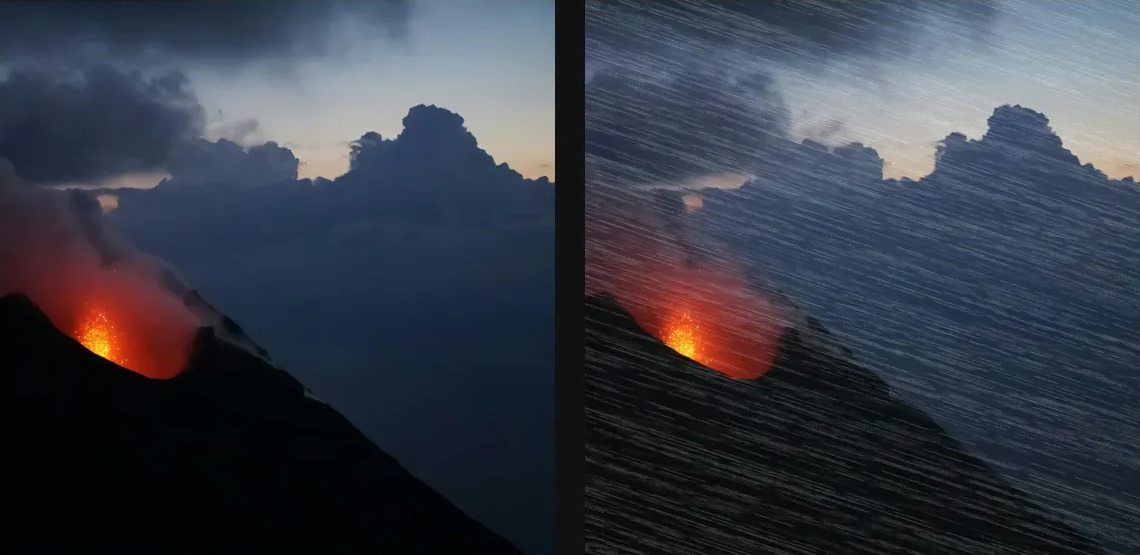
Compare and finish
Toggle the layer eye to compare with the incoming composition. Use the Effect Panel footer for opacity and blend mode, or add a mask to limit the affected area. In Video or Live, use the function menu on a supported control to add keyframes or a driver.
Control reference
Show individual controls
| Control | What it does | Values and animation |
|---|---|---|
| Ambient | minimum light level on shaded scratch normals | 0 to 1 Default: 0.78 Continuous keyframes |
| Angle | direction the hairline scratches run across the image | 0° to 360° Default: 18° Continuous keyframes |
| Density | coverage of the generated micro-scratch field | 0% to 100% Default: 72% Continuous keyframes |
| Dispersion | RGB colour split through the scratched glass normals | 0% to 100% Default: 18% Continuous keyframes |
| Haze | tinted scuff veil blended through the glass | 0% to 100% Default: 8% Continuous keyframes |
| Length | average length of each broken scratch segment | 0 to 20 %; 1 to 500 px (typed input: 1 to 2000) Default: 9 % Continuous keyframes |
| Scratch Light Angle | direction of the grazing key light over the scratches | 0 to 360 Default: 138 Continuous keyframes |
| Refraction | how far scratch normals bend the source image | 0 to 50 %; 0 to 256 px (typed input: 0 to 2000) Default: 0.32 % Continuous keyframes |
| Roughness | height of the scratch groove normal surface | 0 to 1 Default: 0.58 Continuous keyframes |
| Specular | strength of bright glints on scratch edges | 0 to 1 Default: 0.6 Continuous keyframes |
| Tint | colour of the scuff haze | RGBA colour (0 to 255 per channel) Default: RGBA (236, 246, 255, 255) Colour keyframes |
| Width | hairline width of each scratch groove | 0 to 10 %; 1 to 256 px (typed input: 1 to 1000) Default: 0.12 % Continuous keyframes |
| Seed | change for a different random pattern | 0 to 9999 Default: 0 Discrete keyframes |