
Channel Swap
Rewire colour channels so red, green, blue, or alpha exchange roles.
Add Channel Swap
Open an image or build the source composition first. Put this effect after the content it should process in stack processing order. Choose Glitch → Channel Drift → Channel Swap in the effects picker, or search for Channel Swap with Cmd/Ctrl + F. Select the new layer in Layers to open its Effect Panel.
Choose the rewiring
Select Mode and Color Space to change how channels exchange roles. Increase Intensity to blend in the swap.
Break it into bands
Where the mode exposes them, use Band Size, Orientation and Offset for regional changes. Seed provides another arrangement.
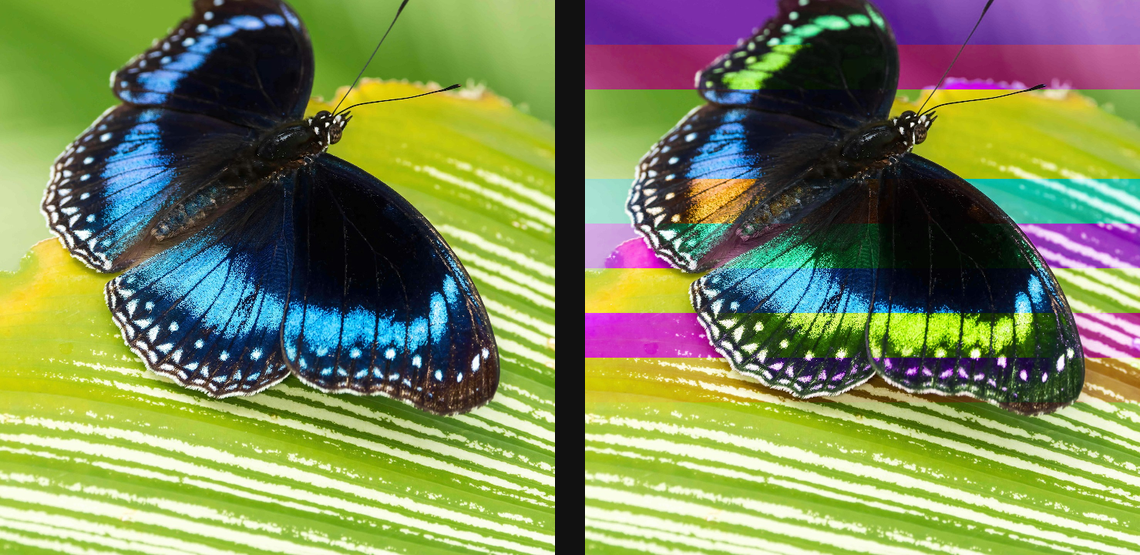
Compare and finish
Toggle the layer eye to compare with the incoming composition. Use the Effect Panel footer for opacity and blend mode, or add a mask to limit the affected area. In Video or Live, use the function menu on a supported control to add keyframes or a driver.
Control reference
Show individual controls
| Control | What it does | Values and animation |
|---|---|---|
| Orientation | split into rows, columns, or blocks | Horizontal / Vertical / Blocks Default: Horizontal Discrete keyframes |
| Band Size | size of each coherent band that swaps as a unit | 0 to 20 %; 1 to 500 px (typed input: 1 to 2000) Default: 8 % Continuous keyframes |
| Offset | pulls the swapped channels from a sideways tap — chromatic tear | 0% to 100% Default: 0% Continuous keyframes |
| Color Space | crush RGB channels, or YCbCr to keep luma and step the colour | RGB / YCbCr (keep luma) Default: RGB Discrete keyframes |
| Intensity | strength of the effect | 0% to 100% Default: 50% Continuous keyframes |
| Seed | change for a different random pattern | 0 to 9999 Default: 0 Discrete keyframes |
| Mode | mix picks a permutation per band, or force one ordering | Mix / R B G / G R B / G B R / B R G / B G R Default: Mix Discrete keyframes |