
3D Shatter
Break the surface into animated 3D glass plates with spread, fall, spin, bevels, and dark gaps.
Add 3D Shatter
Open an image or build the source composition first. Put this effect after the content it should process in stack processing order. Choose Material → Damage → 3D Shatter in the effects picker, or search for 3D Shatter with Cmd/Ctrl + F. Select the new layer in Layers to open its Effect Panel.
Build the plates
Set Size, Jitter and Seed for the fracture layout. Set Origin X and Origin Y at the breakup centre.
Animate the break
Move Progress from the intact state into the breakup. Spread, Gravity, Spin and Tilt control the plate motion; Depth, Bevel and Light Angle style the edges. Keyframe Progress in Video or Live for a timed shatter.
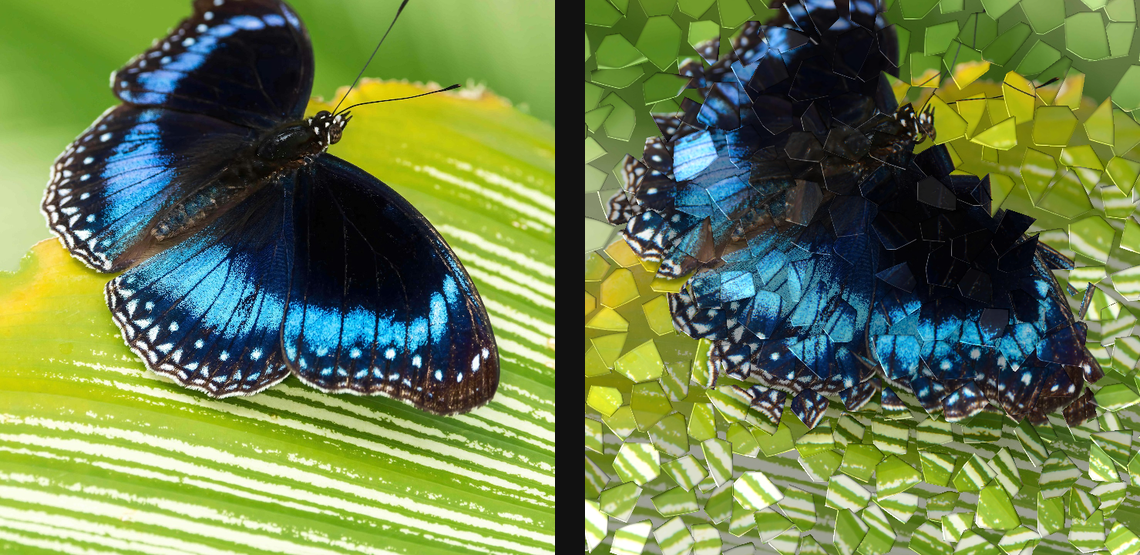
Compare and finish
Toggle the layer eye to compare with the incoming composition. Use the Effect Panel footer for opacity and blend mode, or add a mask to limit the affected area. In Video or Live, use the function menu on a supported control to add keyframes or a driver.
Control reference
Show individual controls
| Control | What it does | Values and animation |
|---|---|---|
| Ambient | minimum light level on shaded plates | 0 to 1 Default: 0.52 Continuous keyframes |
| Bevel | width of the lit plate edge | 0 to 10 %; 1 to 256 px (typed input: 1 to 1000) Default: 0.45 % Continuous keyframes |
| Cracks | darkening along fractured plate edges | 0% to 100% Default: 55% Continuous keyframes |
| Depth | random pseudo-depth scale and overlap variation | 0 to 1 Default: 0.55 Continuous keyframes |
| Dispersion | RGB colour split through tilted glass plates | 0% to 100% Default: 22% Continuous keyframes |
| Gap | dark space opened between separated plates | 0 to 10 %; 1 to 256 px (typed input: 1 to 1000) Default: 0.25 % Continuous keyframes |
| Gravity | downward fall added as the transition advances | 0 to 50 %; 0 to 256 px (typed input: 0 to 2000) Default: 5 % Continuous keyframes |
| Light Angle | direction of the key light over the plates | 0 to 360 Default: 135 Continuous keyframes |
| Origin X | horizontal break origin | 0 to 1 Default: 0.5 Continuous keyframes |
| Origin Y | vertical break origin | 0 to 1 Default: 0.5 Continuous keyframes |
| Progress | transition amount from intact image to separated plates | 0% to 100% Default: 45% Continuous keyframes |
| Seed | change for a different random pattern | 0 to 9999 Default: 0 Discrete keyframes |
| Jitter | how irregularly the shard centres are placed | 0% to 100% Default: 90% Continuous keyframes |
| Size | average size of each moving glass plate | 0 to 100 %; 1 to 500 px (typed input: 1 to 2000) Default: 6.5 % Continuous keyframes |
| Specular | strength of glossy highlights on the moving plates | 0 to 1 Default: 0.55 Continuous keyframes |
| Spin | maximum random spin applied to each plate | 0° to 360° (typed input: 0° to 720°) Default: 110° Continuous keyframes |
| Spread | outward travel distance for the exploding plates | 0 to 50 %; 0 to 256 px (typed input: 0 to 2000) Default: 8 % Continuous keyframes |
| Tilt | height of the virtual tilted glass plates | 0 to 1 Default: 0.65 Continuous keyframes |