
ASCII
Rebuild the image from text glyphs whose characters and brightness follow the source.
Add ASCII
Open an image or build the source composition first. Put this effect after the content it should process in stack processing order. Choose Texture & Pattern → Digital → ASCII in the effects picker, or search for ASCII with Cmd/Ctrl + F. Select the new layer in Layers to open its Effect Panel.
Choose the character field
Pick a Preset or edit Charset, then choose Cell Size and Cell Gap. Characters replace source detail at that cell scale.
Balance tone and colour
Use Gamma and Invert to map brightness into characters. Choose Mode, Foreground and Background for the colour treatment; Weight changes the visible character density.
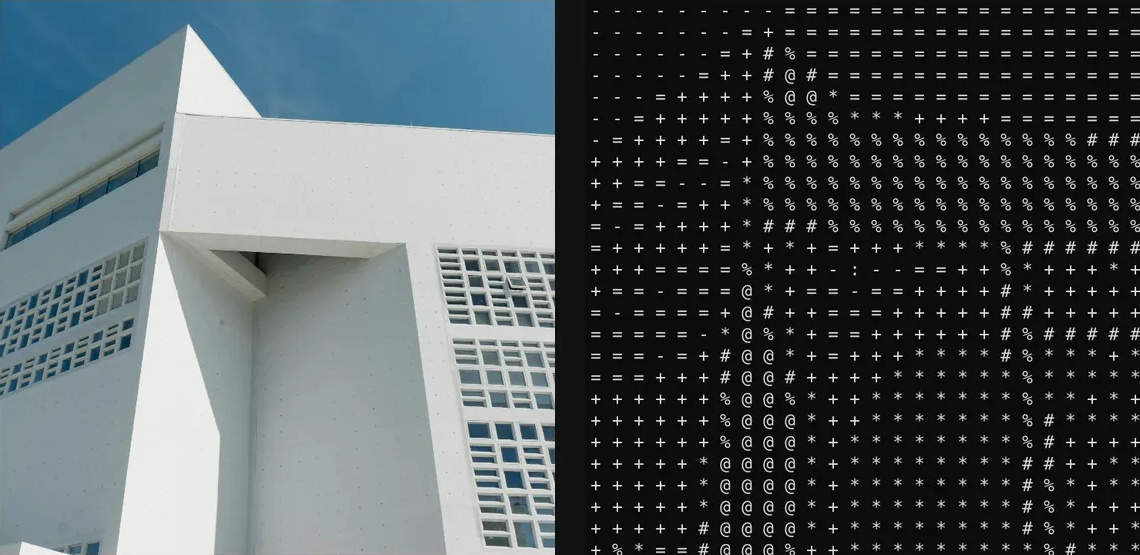
Compare and finish
Toggle the layer eye to compare with the incoming composition. Use the Effect Panel footer for opacity and blend mode, or add a mask to limit the affected area. In Video or Live, use the function menu on a supported control to add keyframes or a driver.
Control reference
Show individual controls
| Control | What it does | Values and animation |
|---|---|---|
| Background | Colour behind the ASCII glyphs, including its alpha coverage. | RGBA colour (0 to 255 per channel) Default: RGBA (12, 12, 12, 255) Colour keyframes |
| Cell Gap | Space between glyph cells; negative values overlap cells | -10 to 10 % (typed input: -50 to 50); -64 to 64 px (typed input: -1000 to 1000) Default: 0 px Continuous keyframes |
| Cell Size | Sets the size of each ASCII character cell. | 0.3 to 25 %; 3 to 256 px (typed input: 3 to 2000) Default: 10 px Continuous keyframes |
| Charset | Chooses the set of glyphs used to represent source tones. | Available presets Default: .:-=+*#%@ Not keyframeable |
| Mode | Chooses a single foreground glyph colour in Mono or samples the source image's glyph colours in Colour. | Mono / Colour Default: Mono Discrete keyframes |
| Foreground | Glyph colour used when ASCII Colour Mode is Mono. | RGBA colour (0 to 255 per channel) Default: RGBA (220, 220, 220, 255) Colour keyframes |
| Weight | Synthetic glyph stroke weight | 100 to 900 Default: 400 Discrete keyframes |
| Gamma | Curves source brightness before choosing characters from the ASCII ramp. | 0.1 to 4 Default: 1 Continuous keyframes |
| Invert | Reverses the brightness-to-character ramp so light and dark glyph choices trade places. | On / Off Default: Off Discrete keyframes |
| Preset | Orders glyphs from sparse to dense coverage for the ASCII brightness ramp. | Standard / ASCII — Long / Blocks / Blocks — Vertical / Blocks — Horizontal / Circles / Squares / Dots / Braille / Detailed / Minimal / Binary / Digits / Hex / CP437 / Punctuation / Symbols / Stars / Cards / Dice / Music / Lines — Horizontal / Lines — Vertical / Lines — Cross / Chinese / Japanese / Korean / Hindi / Arabic / Custom Default: Standard Discrete keyframes |