
Wavelet Smear
Smear decomposed image detail across scales for spectral blur and broken compression texture.
Add Wavelet Smear
Open an image or build the source composition first. Put this effect after the content it should process in stack processing order. Choose Glitch → Byte & Color Damage → Wavelet Smear in the effects picker, or search for Wavelet Smear with Cmd/Ctrl + F. Select the new layer in Layers to open its Effect Panel.
Choose the scales
Set Levels for the depth of the wavelet decomposition. Include Approximation determines whether broad structure also participates.
Smear the bands
Set Smear Mode, Direction and Smear Amount. Level Falloff changes the contribution across scales; Seed varies stochastic treatments.
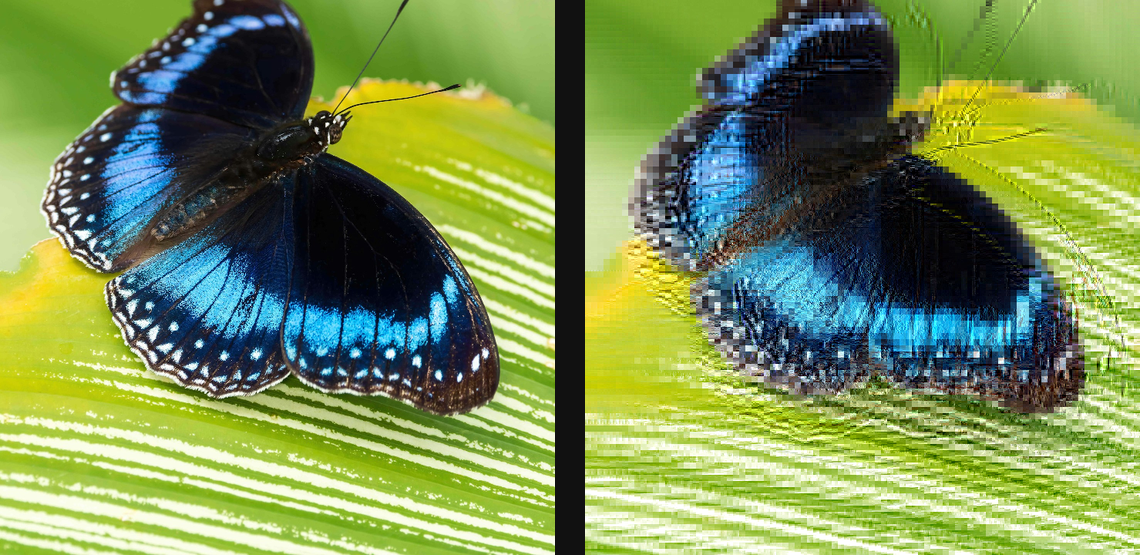
Compare and finish
Toggle the layer eye to compare with the incoming composition. Use the Effect Panel footer for opacity and blend mode, or add a mask to limit the affected area. In Video or Live, use the function menu on a supported control to add keyframes or a driver.
Control reference
Show individual controls
| Control | What it does | Values and animation |
|---|---|---|
| Include Approximation | also smear the coarse base — a heavier full-image melt | On / Off Default: Off Discrete keyframes |
| Level Falloff | how much less the coarser scales smear | 0% to 100% Default: 50% Continuous keyframes |
| Seed | change for a different random pattern | 0 to 9999 Default: 0 Discrete keyframes |
| Smear Amount | how far the detail bands displace — 0 is a clean passthrough | 0 to 20 %; 1 to 500 px (typed input: 1 to 2000) Default: 4 % Continuous keyframes |
| Direction | direction the detail bands smear | 0 to 360 Default: 0 Continuous keyframes |
| Smear Mode | directional smears one way; noise jitters the direction per detail | Directional / Noise Default: Directional Discrete keyframes |
| Levels | how many resolution scales bleed — more = coarser smearing | 1 to 3 Default: 2 Discrete keyframes |