
Plastic Wrap
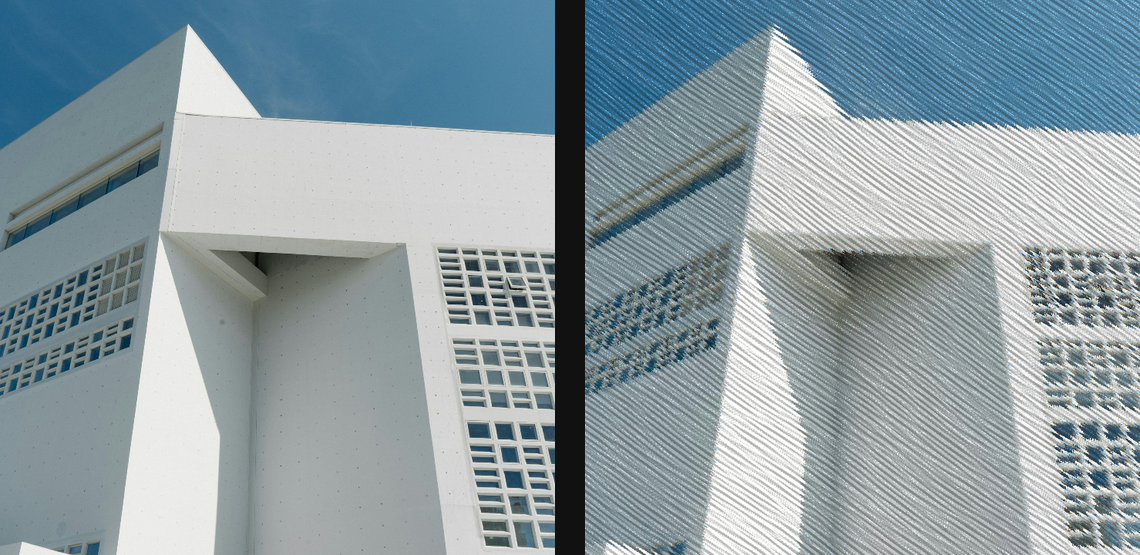
Wrap the image in glossy crinkled film with ridge highlights, transparent refraction, and haze.
Add Plastic Wrap
Open an image or build the source composition first. Put this effect after the content it should process in stack processing order. Choose Material → Damage → Plastic Wrap in the effects picker, or search for Plastic Wrap with Cmd/Ctrl + F. Select the new layer in Layers to open its Effect Panel.
Shape the film
Set Scale, Crinkle, Stretch and Tension for the wrinkles. Increase Refraction to bend the source through them.
Catch the light
Adjust Light Angle, Highlight and Roughness for the glossy ridges. Use Haze and Tint for the film, adding Dispersion sparingly.
Compare and finish
Toggle the layer eye to compare with the incoming composition. Use the Effect Panel footer for opacity and blend mode, or add a mask to limit the affected area. In Video or Live, use the function menu on a supported control to add keyframes or a driver.
Control reference
Show individual controls
| Control | What it does | Values and animation |
|---|---|---|
| Crinkle | height and sharpness of the folded plastic surface | 0 to 1 Default: 0.72 Continuous keyframes |
| Dispersion | RGB colour split through the refracted plastic film | 0% to 100% Default: 16% Continuous keyframes |
| Haze | transparent milky veil blended through the wrap | 0% to 100% Default: 12% Continuous keyframes |
| Highlight | strength of sharp glints along crinkle ridges | 0 to 1 Default: 0.72 Continuous keyframes |
| Plastic Light Angle | direction of the key light over the crinkled film | 0 to 360 Default: 125 Continuous keyframes |
| Refraction | how far crinkled film normals bend the source image | 0 to 50 %; 0 to 256 px (typed input: 0 to 2000) Default: 0.55 % Continuous keyframes |
| Roughness | how broad and broken the glossy highlights become | 0 to 1 Default: 0.32 Continuous keyframes |
| Scale | feature size of the plastic folds and wrinkle cells | 0 to 100 %; 1 to 500 px (typed input: 1 to 2000) Default: 4 % Continuous keyframes |
| Stretch | how strongly folds align along the tension direction | 0% to 100% Default: 55% Continuous keyframes |
| Tension | direction the stretched plastic wrinkles prefer | 0° to 360° Default: 35° Continuous keyframes |
| Tint | subtle colour cast of the plastic haze | RGBA colour (0 to 255 per channel) Default: RGBA (238, 246, 255, 255) Colour keyframes |
| Seed | change for a different random pattern | 0 to 9999 Default: 0 Discrete keyframes |