
Risograph
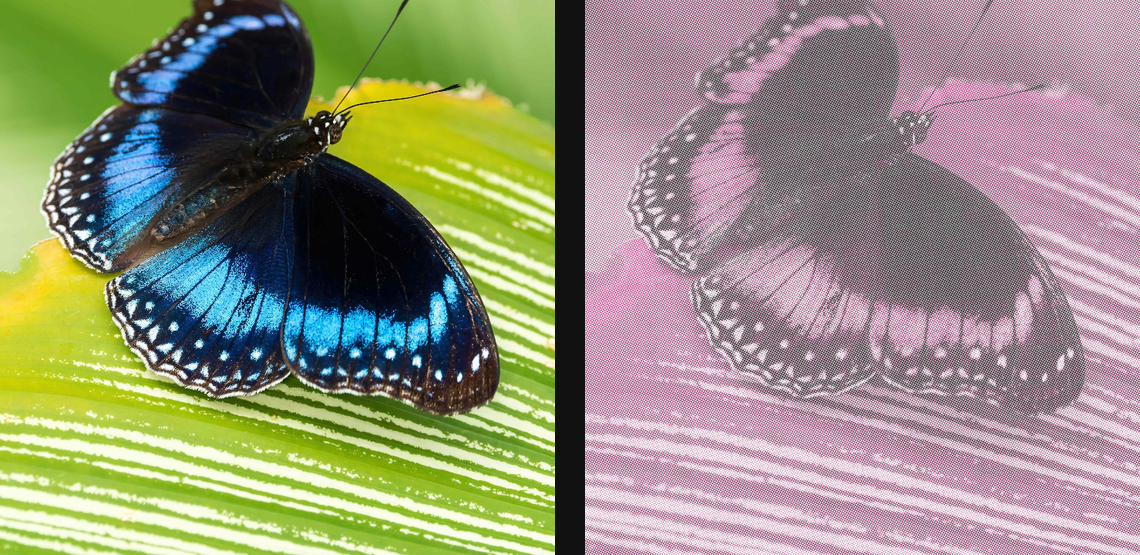
Simulate two-ink risograph printing with grain, density, plate offset, and misregistration.
Add Risograph
Open an image or build the source composition first. Put this effect after the content it should process in stack processing order. Choose Texture & Pattern → Print → Risograph in the effects picker, or search for Risograph with Cmd/Ctrl + F. Select the new layer in Layers to open its Effect Panel.
Choose inks
Select the number of Inks and a Palette, then set the individual Ink colours. Choose Paper to establish the background.
Add print character
Set Dot Size and Halftone Pattern, then Misregistration and Direction for plate offset. Use Ink Density, Ink Spread and Paper Grain to tune the print without losing the subject.
Edit the shared palette
Open Palette in Inks to choose and edit the ink set. Colors and Palettes explains adding and moving stops, editing colour and opacity, extracting colours and saving a palette for reuse.
Set an individual colour
Click the relevant colour swatch to open its picker. Colors and Palettes explains colour values, transparency and the canvas sampling controls where available.
Compare and finish
Toggle the layer eye to compare with the incoming composition. Use the Effect Panel footer for opacity and blend mode, or add a mask to limit the affected area. In Video or Live, use the function menu on a supported control to add keyframes or a driver.
Control reference
Show individual controls
| Control | What it does | Values and animation |
|---|---|---|
| Inks | how many inks to sample from the palette, one to four | 1 to 4 Default: 2 Discrete keyframes |
| Dot Size | bigger cells = coarser, more graphic dots | 0 to 20 %; 1 to 500 px (typed input: 1 to 2000) Default: 0.4 % Continuous keyframes |
| Halftone Pattern | break each ink into mesh dots, like real screen prints | On / Off Default: On Discrete keyframes |
| Misregistration | how far each ink prints off alignment — higher = hand-printed | 0 to 5 %; 0 to 32 px (typed input: 0 to 2000) Default: 0.3 % Continuous keyframes |
| Direction | how the per-layer offsets are spread | Random per layer / Diagonal / Horizontal Default: Random per layer Discrete keyframes |
| Palette | Chooses the gradient or discrete palette used for colour quantization. | Available presets Default: risoInkBlackPink Discrete keyframes |
| Paper | Substrate colour — cream, kraft, grey stock… | Colour Default: #ffffff Colour keyframes |
| Paper Grain | recycled-paper fleck overlay — higher = zine territory | 0% to 100% Default: 40% Continuous keyframes |
| Black Generation | Controls how much shared CMY ink is replaced by the black plate. | 0% to 100% Default: 72% Continuous keyframes |
| Ink Limit | Limits combined ink coverage across the simulated colour plates; lower values reduce heavy overprinting. | 0% to 100% Default: 72% Continuous keyframes |
| Overprint | Sets how much overlapping printed plates mix as ink layers. | 0% to 100% Default: 72% Continuous keyframes |
| Paper Absorption | Strength of paper absorption and paper-tooth variation in the simulated print coverage. | 0% to 100% Default: 24% Continuous keyframes |
| Plate Curve | Shapes the tonal response of each simulated print plate. | 0% to 100% Default: 46% Continuous keyframes |
| Press Drift | Varies simulated plate alignment across the image. | 0% to 100% Default: 16% Continuous keyframes |
| Seed | Selects a repeatable random pattern for Risograph; the same seed repeats its layout. | 0 to 1000 Default: 0 Discrete keyframes |
| Trapping | Expands plate edges to cover small registration gaps. | 0% to 100% Default: 10% Continuous keyframes |
| Chaos | Extra random per-layer slip — the 'press is drifting' look | 0% to 100% Default: 0% Continuous keyframes |
| Phase | Rotates the misregistration. Keyframe 0→1 for a seamless breathing loop. | 0 to 1 Default: 0 Continuous keyframes |
| Seed | Selects a repeatable random pattern for Risograph; the same seed repeats its layout. | 0 to 1000 Default: 0 Discrete keyframes |
| Ink 1 | screen angle for the first ink layer | 0° to 360° Default: 15° Continuous keyframes |
| Ink 2 | screen angle for the second ink layer | 0° to 360° Default: 75° Continuous keyframes |
| Ink 3 | screen angle for the third ink layer | 0° to 360° Default: 0° Continuous keyframes |
| Ink 4 | screen angle for the fourth ink layer | 0° to 360° Default: 45° Continuous keyframes |
| Ink Density | overall ink strength; lower is lighter, higher overprints | 0% to 125% Default: 92% Continuous keyframes |
| Ink Spread | physical dot gain — higher pushes more ink into midtones | 0% to 100% Default: 16% Continuous keyframes |
| Ink Texture | uneven transfer from paper tooth and ink coverage breakup | 0% to 100% Default: 12% Continuous keyframes |
| Saturation | punches up colours before separating into inks | 0% to 150% Default: 110% Continuous keyframes |
| Stops | Editable palette stops. Change their position, colour or opacity to reshape the quantized palette. | Gradient stops Default: None Not keyframeable |