
Sonification
Treat image bytes as audio, process them with audio effects, then map the result back into pixels.
Add Sonification
Open an image or build the source composition first. Put this effect after the content it should process in stack processing order. Choose Glitch → Sonification in the effects picker, or search for Sonification with Cmd/Ctrl + F. Select the new layer in Layers to open its Effect Panel.
Choose the processing
Choose Processing for the audio-style operation applied to the image bytes. Set Scan Direction for how the image is read, and Ignore Alpha when transparency should be excluded.
Tune the selected processor
Open its matching controls, such as Echo delay and decay or Flanger depth and speed. Make small changes and inspect the image; the controls affect pixel structure, not an audible soundtrack.
Vary the result
Change Phase for a different position through the signal treatment. Animate supported controls in Video or Live and compare the result with the layer eye.
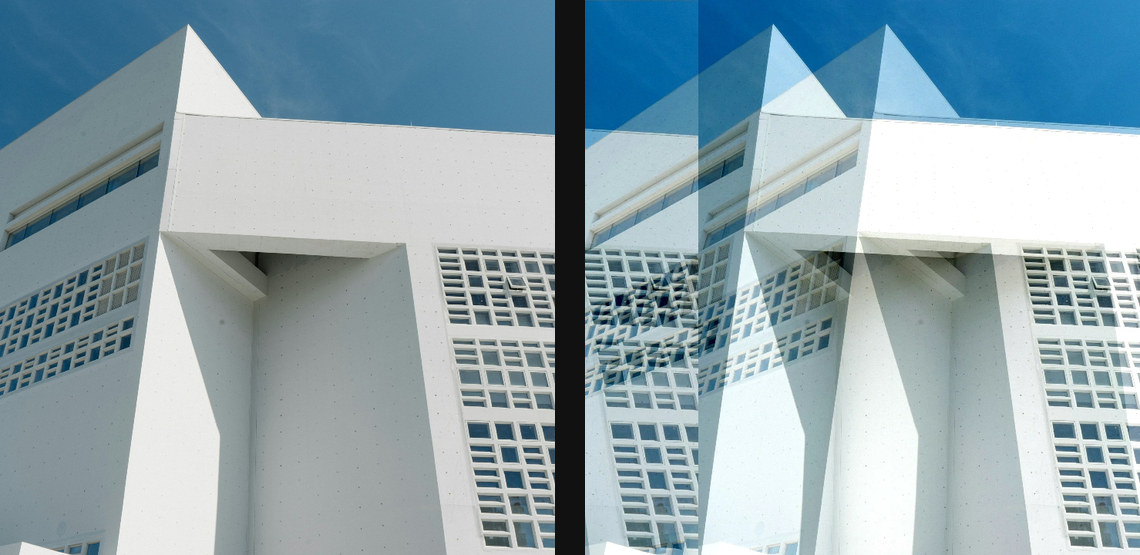
Compare and finish
Toggle the layer eye to compare with the incoming composition. Use the Effect Panel footer for opacity and blend mode, or add a mask to limit the affected area. In Video or Live, use the function menu on a supported control to add keyframes or a driver.
Control reference
Show individual controls
| Control | What it does | Values and animation |
|---|---|---|
| Scan Direction | axis pixels are read along — artefacts align with this | 0° to 360° Default: 0° Continuous keyframes |
| Ignore Alpha | leave alpha untouched, process only RGB | On / Off Default: On Discrete keyframes |
| Phase | gently moves the sonification artifacts along the scan track; keyframe 0 to 1 for a loop | 0 to 1 Default: 0 Continuous, overflow allowed |
| Processing | Interleaved scans RGB bytes as one sequence. Per channel processes each colour channel separately. | Interleaved / Per channel Default: Interleaved Not keyframeable |
| Echo / Decay | Strength retained by repeated or feedback pixel-stream samples. | 0.01 to 1 Default: 0.3 Continuous keyframes |
| Echo / Delay | echo gap or comb-filter offset | 0 to 100 % (typed input: 0 to 400); 0 to 500 px (typed input: 0 to 8000); 0 to 5000 ms (typed input: 0 to 60000) Default: 6 % Continuous keyframes |
| Echo / Input Gain | Input level applied to the scanned pixel stream before processing. | 0 to 1 Default: 0.8 Continuous keyframes |
| Echo / Output Gain | Output level applied after the pixel-stream transform. | 0 to 1 Default: 0.9 Continuous keyframes |
| Echo / Speed | modulation cycle length — %/px scales with the canvas; Hz keeps legacy audio timing | 0.1 to 100 % (typed input: 0.1 to 400); 1 to 500 px (typed input: 1 to 8000); 0.1 to 20000 Hz (typed input: 0.1 to 20000) Default: 20 % Continuous keyframes |
| Bass Boost / Gain | boost (positive) or cut (negative) the targeted frequencies | -20dB to 20dB Default: 5dB Continuous keyframes |
| Treble Boost / Gain | boost (positive) or cut (negative) the targeted frequencies | -20dB to 20dB Default: 5dB Continuous keyframes |
| Phaser / Decay | Strength retained by repeated or feedback pixel-stream samples. | 0 to 0.99 Default: 0.4 Continuous keyframes |
| Phaser / Delay | echo gap or comb-filter offset | 0 to 100 % (typed input: 0 to 400); 0 to 500 px (typed input: 0 to 8000); 0 to 5000 ms (typed input: 0 to 60000) Default: 1.5 % Continuous keyframes |
| Phaser / Input Gain | Input level applied to the scanned pixel stream before processing. | 0 to 1 Default: 0.8 Continuous keyframes |
| Phaser / Output Gain | Output level applied after the pixel-stream transform. | 0 to 1 Default: 0.7 Continuous keyframes |
| Flanger / Delay | echo gap or comb-filter offset | 0 to 100 % (typed input: 0 to 400); 0 to 500 px (typed input: 0 to 8000); 0 to 5000 ms (typed input: 0 to 60000) Default: 0 % Continuous keyframes |
| Flanger / Depth | Depth of the delay modulation applied to the pixel stream. | 0 to 100 % (typed input: 0 to 400); 0 to 500 px (typed input: 0 to 8000); 0 to 5000 ms (typed input: 0 to 60000) Default: 3 % Continuous keyframes |
| Flanger / Regeneration | feedback — higher intensifies the sweep | 0 to 1 Default: 0.5 Continuous keyframes |
| Flanger / Shape | modulator waveform — Sine is smooth, Triangle linear | Sine / Triangle Default: Sine Discrete keyframes |
| Flanger / Speed | modulation cycle length — %/px scales with the canvas; Hz keeps legacy audio timing | 0.1 to 100 % (typed input: 0.1 to 400); 1 to 500 px (typed input: 1 to 8000); 0.1 to 20000 Hz (typed input: 0.1 to 20000) Default: 20 % Continuous keyframes |
| Flanger / Width | higher = more chromatic banding across channels | 0% to 100% Default: 71% Continuous keyframes |
| Chorus / Decay | Strength retained by repeated or feedback pixel-stream samples. | 0 to 1 Default: 0.4 Continuous keyframes |
| Chorus / Delay | echo gap or comb-filter offset | 0 to 100 % (typed input: 0 to 400); 0 to 500 px (typed input: 0 to 8000); 0 to 5000 ms (typed input: 0 to 60000) Default: 8 % Continuous keyframes |
| Chorus / Depth | Depth of the delay modulation applied to the pixel stream. | 0 to 100 % (typed input: 0 to 400); 0 to 500 px (typed input: 0 to 8000); 0 to 5000 ms (typed input: 0 to 60000) Default: 3 % Continuous keyframes |
| Chorus / Input Gain | Input level applied to the scanned pixel stream before processing. | 0 to 1 Default: 0.7 Continuous keyframes |
| Chorus / Output Gain | Output level applied after the pixel-stream transform. | 0 to 1 Default: 0.9 Continuous keyframes |
| Vibrato / Depth | Depth of the delay modulation applied to the pixel stream. | 0 to 100 % (typed input: 0 to 400); 0 to 500 px (typed input: 0 to 8000); 0 to 5000 ms (typed input: 0 to 60000) Default: 1 % Continuous keyframes |
| Vibrato / Cycle | modulation cycle length — %/px scales with the canvas; Hz keeps legacy audio timing | 0.1 to 100 % (typed input: 0.1 to 400); 1 to 500 px (typed input: 1 to 8000); 0.1 to 20000 Hz (typed input: 0.1 to 20000) Default: 20 % Continuous keyframes |
| Tremolo / Depth | Depth of the periodic pixel-value amplitude modulation. | 0 to 1 Default: 0.5 Continuous keyframes |
| Tremolo / Cycle | modulation cycle length — %/px scales with the canvas; Hz keeps legacy audio timing | 0.1 to 100 % (typed input: 0.1 to 400); 1 to 500 px (typed input: 1 to 8000); 0.1 to 20000 Hz (typed input: 0.1 to 20000) Default: 20 % Continuous keyframes |
| Distortion / Amount | higher = harsher banding and clipping | 0 to 1 Default: 0.5 Continuous keyframes |
| Distortion / Input Level | drive into the distortion | 0 to 10 Default: 1 Continuous keyframes |
| Distortion / Output Level | output level — compensates for heavy drive | 0 to 10 Default: 1 Continuous keyframes |
| Bit Crusher / Bits | Bit depth retained in each quantized pixel-stream sample; fewer bits create coarser banding. | 1 to 16 Default: 8 Continuous keyframes |
| Bit Crusher / Input Level | drive into the distortion | 0.1 to 4 Default: 1 Continuous keyframes |
| Bit Crusher / Output Level | output level — compensates for heavy drive | 0.1 to 4 Default: 1 Continuous keyframes |
| Time Stretch / Tempo | below 1 stretches, above 1 compresses and repeats | 0.5x to 2x Default: 0.5x Continuous keyframes |
| Compressor / Attack | short clamps edges, long lets them through | 0.001s to 1s Default: 0.2s Continuous keyframes |
| Compressor / Decay | Strength retained by repeated or feedback pixel-stream samples. | 0.001s to 1s Default: 0.8s Continuous keyframes |
| Compressor / Makeup Gain | output boost to compensate for compression | 0dB to 20dB Default: 8dB Continuous keyframes |
| Compressor / Ratio | 1 = no compression, 20 = hard limiting | 1 to 20 Default: 20 Continuous keyframes |
| Compressor / Soft Knee | how gradually compression engages near the threshold | 0.01 to 1 Default: 0.01 Continuous keyframes |
| Compressor / Threshold | level above which compression engages | -60dB to 0dB Default: -20dB Continuous keyframes |
| High-pass Filter / Cutoff Scale | cutoff scale — %/px follows canvas size; Hz keeps legacy audio timing | 0.1 to 100 % (typed input: 0.1 to 400); 1 to 500 px (typed input: 1 to 8000); 0.1 to 20000 Hz (typed input: 0.1 to 20000) Default: 1 % Continuous keyframes |
| Low-pass Filter / Cutoff Scale | cutoff scale — %/px follows canvas size; Hz keeps legacy audio timing | 0.1 to 100 % (typed input: 0.1 to 400); 1 to 500 px (typed input: 1 to 8000); 0.1 to 20000 Hz (typed input: 0.1 to 20000) Default: 0.1 % Continuous keyframes |