
Compression
Simulate aggressive JPEG and block-compression artifacts, ringing, chroma loss, and repeated damage.
Add Compression
Open an image or build the source composition first. Put this effect after the content it should process in stack processing order. Choose Glitch → Byte & Color Damage → Compression in the effects picker, or search for Compression with Cmd/Ctrl + F. Select the new layer in Layers to open its Effect Panel.
Choose the codec look
Select Preset and Mode, then lower Quality for stronger compression damage. Set Block Size for the block structure.
Build degradation
Increase Iterations for repeated damage and use Chroma for colour loss. Jitter varies the block response; inspect text and high-contrast edges to judge the artifacts.
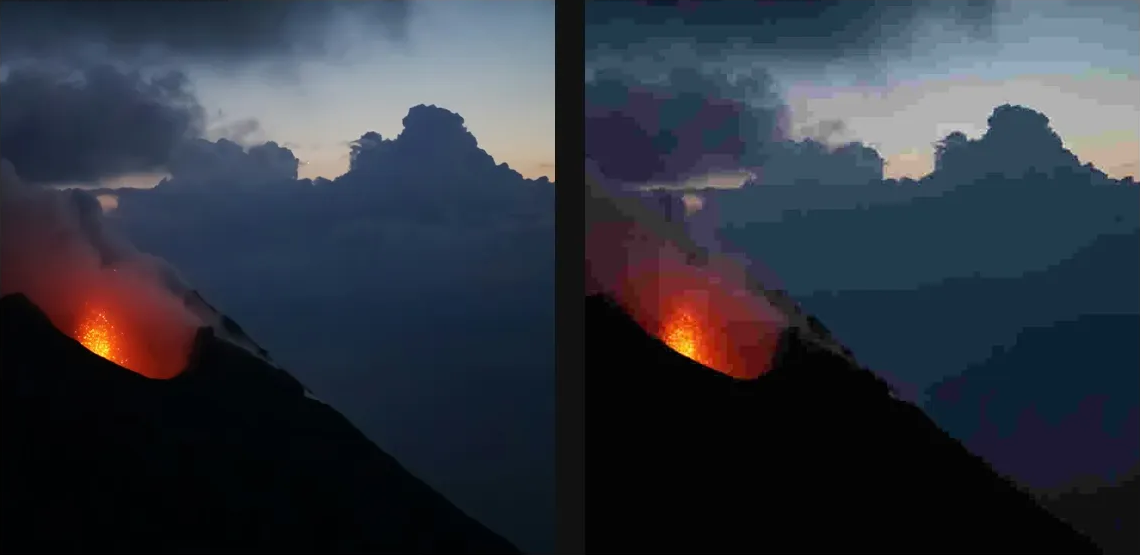
Compare and finish
Toggle the layer eye to compare with the incoming composition. Use the Effect Panel footer for opacity and blend mode, or add a mask to limit the affected area. In Video or Live, use the function menu on a supported control to add keyframes or a driver.
Control reference
Show individual controls
| Control | What it does | Values and animation |
|---|---|---|
| Jitter | shift the encoder's 8x8 grid so block edges land off-feature | 0 to 7 Default: 0 Discrete keyframes |
| Block Size | fake a non-standard block size by pre-flattening the image to that grid | 4px to 64px Default: 8px Discrete keyframes |
| Chroma | colour-channel quality — drop this far below the main quality for retro chroma smear | 1 to 100 Default: 50 Discrete keyframes |
| Iterations | how many times to encode/decode — the saved-from-email-twenty-times look | 1 to 20 Default: 1 Discrete keyframes |
| Mode | which compression flavour — chroma drift, block jitter, repeat-encode, or custom block size | JPEG / Chroma Shift / Block Jitter / Repeat / Block Size / Custom Default: JPEG Discrete keyframes |
| Preset | pre-built recipe — Custom unlocks every slider | Pristine / CD Quality / Floppy Disk / Low Bitrate / Extreme / Phase Glitch / Chroma Drift / Custom Default: Custom Discrete keyframes |
| Quality | JPEG quality — 100 looks lossless, 50 is obviously a JPEG, 5 is all blocks | 1 to 100 Default: 70 Discrete keyframes |