
Pixel Sorting
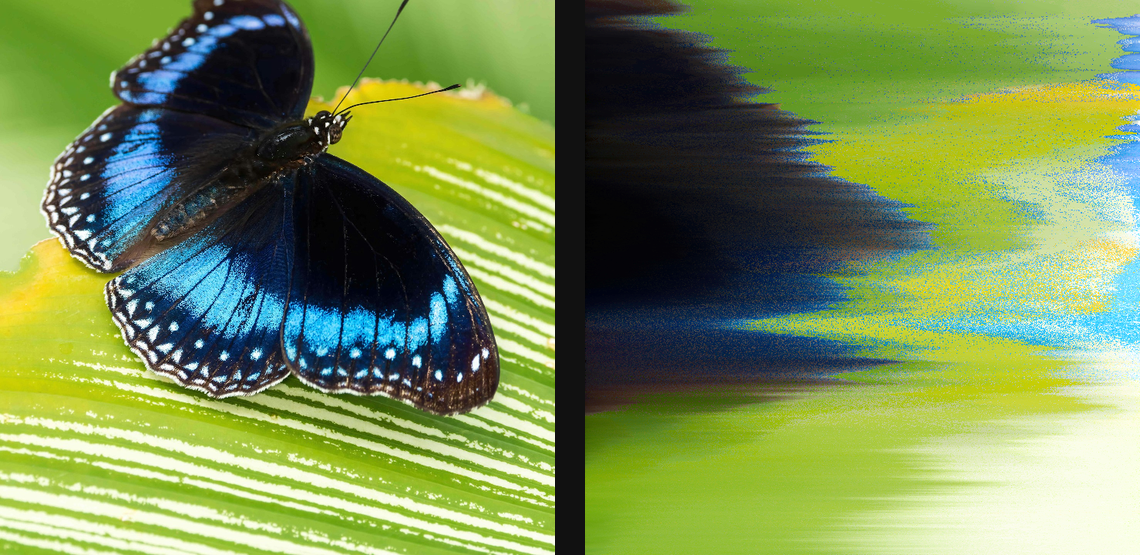
Sort pixels along paths and intervals to create flowing streaks, melts, and colour separations.
Add Pixel Sorting
Open an image or build the source composition first. Put this effect after the content it should process in stack processing order. Choose Glitch → Pixel Sorting in the effects picker, or search for Pixel Sorting with Cmd/Ctrl + F. Select the new layer in Layers to open its Effect Panel.
Choose the path
In Path, select Mode. Adjust Angle or the mode-specific origin and field controls so the path follows the direction you want to sort. Turn on canvas handles for editable spatial paths.
Choose what sorts
In Sort, choose Sort By and Order. In Target, choose the source test and set its threshold or range; increase Quantity until useful regions participate.
Set streak length
In Interval, choose Mode and adjust Length or Min/Max Length where available. Continuous Streamlines follow the field to their natural ends; interval controls apply to segmented modes. Finish with Smoothing, Feather or a gradient in Effects.
Edit the shared palette
Enable Gradient in Effects to show Palette. Colors and Palettes explains adding and moving stops, editing colour and opacity, extracting colours and saving a palette for reuse.
Compare and finish
Toggle the layer eye to compare with the incoming composition. Use the Effect Panel footer for opacity and blend mode, or add a mask to limit the affected area. In Video or Live, use the function menu on a supported control to add keyframes or a driver.
Control reference
Show individual controls
| Control | What it does | Values and animation |
|---|---|---|
| Height | wave height — negative flips the phase | -50 to 50 %; -256 to 256 px Default: 1 % Continuous keyframes |
| Angle | orientation of the path | 0° to 360° Default: 0° Continuous, overflow allowed |
| X Origin | horizontal pivot the fan opens away from | 0% to 100% Default: 0% Continuous keyframes |
| Y Origin | vertical pivot the fan opens away from | 0% to 100% Default: 50% Continuous keyframes |
| Blend | colour space used between palette stops | OKLab / RGB / HSL Default: OKLab Discrete keyframes |
| Continuous Streamlines | Keeps vector-field streamlines continuous through the sorting region. | On / Off Default: Off Discrete keyframes |
| Curve Smoothness | Smooths bends in the sorting path so neighbouring pixel runs follow a more continuous curve. | 0% to 100% Default: 100% Continuous keyframes |
| Dipole AX | horizontal position of the first pole | 0 to 1 Default: 0.3 Continuous keyframes |
| Dipole AY | vertical position of the first pole | 0 to 1 Default: 0.5 Continuous keyframes |
| Dipole BX | horizontal position of the second pole | 0 to 1 Default: 0.7 Continuous keyframes |
| Dipole BY | vertical position of the second pole | 0 to 1 Default: 0.5 Continuous keyframes |
| Pole Sign | how the two poles interact | Opposite Poles / Same Poles / Both Attract Default: Opposite Poles Discrete keyframes |
| Feather | fades interval edges without changing their colour order | On / Off Default: Off Discrete keyframes |
| Feather Knee | how far the edge fade reaches into each interval | 0% to 50% Default: 20% Continuous keyframes |
| Feather Opacity | opacity at the feathered interval edges | 0% to 100% Default: 0% Continuous keyframes |
| Octaves | more octaves = finer flow detail | 1 to 6 Default: 3 Discrete keyframes |
| Feature Size | average size of the noise features | 0.5 to 300 % (typed input: 0.5 to 1000); 5 to 4000 px (typed input: 5 to 16000) Default: 5 % Continuous keyframes |
| Seed | change for a different random pattern | 0 to 1000 Default: 0 Discrete keyframes |
| Tightness | positive winds tighter, negative inverts the wind | -2 to 2 Default: 0.5 Continuous keyframes |
| Gradient | replaces each interval with the selected gradient palette | On / Off Default: Off Discrete keyframes |
| Interval Blur | softens the seams between adjacent intervals | 0% to 100% Default: 0% Continuous keyframes |
| Length | base length each random interval rolls around | 0 to 100 %; 0 to 4000 px (typed input: 0 to 16000) Default: 7.5 % Continuous keyframes |
| Length Variance | how widely each rolled length deviates from the base — 0 = uniform, 100 = full spread | 0% to 100% Default: 100% Continuous keyframes |
| Mode | how the path is sliced into sortable runs | Threshold / Random / All Default: Threshold Discrete keyframes |
| Seed | drifts random interval length and offset patterns — same number repeats the layout | 0 to 999999 Default: 0 Discrete keyframes |
| Shift | slides intervals along the path — animate to flow | 0% to 100% Default: 0% Continuous keyframes |
| Thickness | perpendicular streamline width — wider = blockier streaks | 0.5 to 50 %; 1 to 500 px Default: 1 px Continuous keyframes |
| Offset | shifts the vortex line off centre | -0.5 to 0.5 Default: 0 Continuous keyframes |
| Vortex Radius | size of each vortex | 0.01 to 0.3 Default: 0.08 Continuous keyframes |
| Spacing | lower = more eddies packed together | 0.02 to 0.5 Default: 0.15 Continuous keyframes |
| Strength | how hard each vortex bends the flow | 0 to 5 Default: 0.6 Continuous keyframes |
| Max Length | caps each interval so one streak can't dominate | 0.1 to 100 %; 1 to 2000 px (typed input: 1 to 10000) Default: 100 % Continuous keyframes |
| Min Length | skips intervals too short to register | 0 to 100 %; 0 to 2000 px (typed input: 0 to 10000) Default: 0 % Continuous keyframes |
| Mirror | blends each sorted run with a reflected copy | On / Off Default: Off Discrete keyframes |
| Mirror Knee | where the reflection folds inside each run | 0% to 100% Default: 50% Continuous keyframes |
| Radius | size of the obstacle | 0.01 to 0.5 Default: 0.15 Continuous keyframes |
| X Origin | horizontal position of the obstacle | 0% to 100% Default: 50% Continuous keyframes |
| Y Origin | vertical position of the obstacle | 0% to 100% Default: 50% Continuous keyframes |
| Output Only Sorted | hides unsorted pixels, leaving streaks on transparent | On / Off Default: Off Discrete keyframes |
| Order | ascending or descending order | Ascending / Descending Default: Ascending Discrete keyframes |
| Origin | shifts the wave sideways | 0% to 100% Default: 0% Continuous keyframes |
| Palette | gradient palette sampled from the start to end of every interval | Available presets Default: madphase Discrete keyframes |
| Path AA | smooths jagged vector-field path edges after sorting | 0% to 100% Default: 20% Continuous keyframes |
| Path Control1 X | Horizontal position of the sorting path's control point 1. | -2 to 3 Default: 0.38333334 Continuous keyframes |
| Path Control1 Y | Vertical position of the sorting path's control point 1. | -2 to 3 Default: 0.5 Continuous keyframes |
| Path Control2 X | Horizontal position of the sorting path's control point 2. | -2 to 3 Default: 0.6166667 Continuous keyframes |
| Path Control2 Y | Vertical position of the sorting path's control point 2. | -2 to 3 Default: 0.5 Continuous keyframes |
| Direction | Chooses which direction the pixels travel along the path. | Forward / Reverse Default: Forward Discrete keyframes |
| End Feather | Blend out at the end of the whole spline. | 0% to 100% Default: 0% Continuous keyframes |
| End Width | Sets the width of the path at its endpoint. | 0% to 100% Default: 100% Continuous keyframes |
| Path End X | Horizontal position of the sorting path's end. | -2 to 3 Default: 0.85 Continuous keyframes |
| Path End Y | Vertical position of the sorting path's end. | -2 to 3 Default: 0.5 Continuous keyframes |
| Side Feather | Blend the spline’s side edges into the underlying image. | 0% to 100% Default: 0% Continuous keyframes |
| Mode | shape of the path the sort travels along | Linear / Spline / Linear Spiral / Wave / Zig Zag / Curve / Blast / Sweep / Rain / Circular / Radial / Spiral / Perlin / Gradient / Isophote / Magnetic Dipole / Topographic / Karman Vortex Street / Flow Around Obstacle Default: Linear Discrete keyframes |
| Scale | curve strength — 0 is straight, sign flips the bend | -200% to 200% Default: 100% Continuous keyframes |
| Shear | Shears the custom sorting path across its width. | -300% to 300% Default: 0% Continuous keyframes |
| Start Feather | Blend in from the beginning of the whole spline. | 0% to 100% Default: 0% Continuous keyframes |
| Start Width | Sets the width of the path at its starting point. | 0% to 100% Default: 100% Continuous keyframes |
| Path Start X | Horizontal position of the sorting path's start. | -2 to 3 Default: 0.15 Continuous keyframes |
| Path Start Y | Vertical position of the sorting path's start. | -2 to 3 Default: 0.5 Continuous keyframes |
| Wobble | Sets the transverse wave displacement of the custom sorting path. | 0 to 100 %; 0 to 500 px Default: 0 px Continuous keyframes |
| Waves | Number of transverse waves along the custom sorting path. | 0 to 32 Default: 3 Continuous keyframes |
| Phase | Slides the custom path's wave through its cycle. | 0% to 100% Default: 0% Continuous keyframes |
| Width | Sets the width of the custom sorting path. | 0.5 to 100 %; 1 to 2000 px Default: 24 px Continuous keyframes |
| Quantity | lower = sparser, dotted streaks | 0% to 100% Default: 100% Continuous keyframes |
| Angle | direction the rain falls — 90° is straight down | 0° to 360° Default: 90° Continuous keyframes |
| Noise Amount | how far each drip wanders sideways | 0 to 20 %; 0 to 256 px Default: 0.4 % Continuous keyframes |
| Noise Scale | lower = jittery drips, higher = long lazy curves | 1px to 512px Default: 64px Continuous keyframes |
| Seed | change for a different random pattern | 0 to 1000 Default: 0 Discrete keyframes |
| Random Offset | jitters interval starts to break up regular spacing | 0% to 100% Default: 0% Continuous keyframes |
| Smoothing | softens the visible single-pixel sort steps | 0% to 100% Default: 0% Continuous keyframes |
| Sort By | which pixel property orders the sort | Brightness / Saturation / Hue / Intensity / Minimum / Red / Green / Blue / Random Default: Brightness Discrete keyframes |
| Source Blur | higher = streamlines follow broad shapes, not detail | 0 to 100 %; 0 to 2000 px (typed input: 0 to 8000) Default: 8 % Continuous keyframes |
| Stops | Editable colour stops used when each sorted interval is replaced by a gradient. | Gradient stops Default: None Per-stop keyframes |
| Style | Traced keeps the patchy fragmented texture; Guided lays uniformly dense flow lines and renders faster | Traced / Guided Default: Traced Discrete keyframes |
| Sweep Exponent | curve sharpness — lower bends harder near the origin | 0.05 to 3 Default: 0.5 Continuous keyframes |
| Flip | uses the positive square-root branch on both sides of the origin | On / Off Default: Off Discrete keyframes |
| Sweep Origin X | horizontal anchor of the sweep curve | 0 to 1 Default: 0.5 Continuous keyframes |
| Sweep Origin Y | vertical anchor of the sweep curve | 0 to 1 Default: 0.5 Continuous keyframes |
| Target | which pixels participate in the sort | Inclusive / Exclusive / All Default: Inclusive Discrete keyframes |
| Threshold Lower | pixels below this value fail the test | 0 to 100 Default: 20 Continuous keyframes |
| Threshold Upper | pixels above this value fail the test | 0 to 100 Default: 80 Continuous keyframes |
| Trigger | pixel property tested against the threshold | Match Sort / Brightness / Saturation / Hue / Intensity / Minimum / Red / Green / Blue / Random Default: Match Sort Discrete keyframes |
| Length | length of one wave cycle or streamline | 1 to 200 %; 1 to 2000 px Default: 2 % Continuous keyframes |
| X Origin | horizontal position of the centre | 0% to 100% Default: 50% Continuous keyframes |
| Y Origin | vertical position of the centre | 0% to 100% Default: 50% Continuous keyframes |