
Crystal Facets
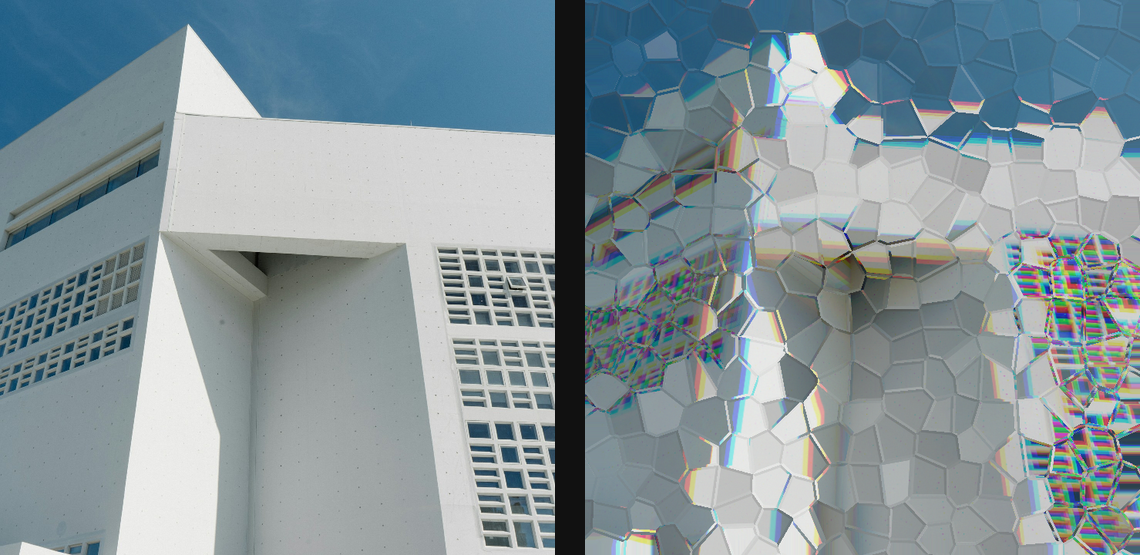
Rebuild the image through lit Voronoi crystal facets with bevels, glints, and dispersion.
Add Crystal Facets
Open an image or build the source composition first. Put this effect after the content it should process in stack processing order. Choose Material → Damage → Crystal Facets in the effects picker, or search for Crystal Facets with Cmd/Ctrl + F. Select the new layer in Layers to open its Effect Panel.
Set the facets
Choose Size, Jitter and Seed for the crystal partitions. Increase Relief and Refraction for the raised glass form.
Light the edges
Tune Bevel, Light Angle, Specular and Edge Glints. Dispersion adds colour splitting; reduce it when the facet structure becomes hard to read.
Compare and finish
Toggle the layer eye to compare with the incoming composition. Use the Effect Panel footer for opacity and blend mode, or add a mask to limit the affected area. In Video or Live, use the function menu on a supported control to add keyframes or a driver.
Control reference
Show individual controls
| Control | What it does | Values and animation |
|---|---|---|
| Dispersion | RGB colour split through the refracted crystal plates | 0% to 100% Default: 24% Continuous keyframes |
| Edge Glints | brightness of glints along facet edges | 0% to 100% Default: 32% Continuous keyframes |
| Ambient | minimum light level on shaded facets | 0 to 1 Default: 0.48 Continuous keyframes |
| Bevel | width of the bright bevel at facet boundaries | 0 to 10 %; 1 to 256 px (typed input: 1 to 1000) Default: 0.45 % Continuous keyframes |
| Jitter | how irregularly the Voronoi facet centres are placed | 0% to 100% Default: 85% Continuous keyframes |
| Facet Light Angle | direction of the key light over the facets | 0 to 360 Default: 135 Continuous keyframes |
| Refraction | how far each tilted plate bends the source image | 0 to 50 %; 0 to 256 px (typed input: 0 to 2000) Default: 0.9 % Continuous keyframes |
| Relief | height of the virtual tilted glass plates | 0 to 1 Default: 0.42 Continuous keyframes |
| Size | average size of each crystal facet | 0 to 100 %; 1 to 500 px (typed input: 1 to 2000) Default: 6 % Continuous keyframes |
| Specular | strength of glossy highlights on the facet normals | 0 to 1 Default: 0.45 Continuous keyframes |
| Seed | change for a different random pattern | 0 to 9999 Default: 0 Discrete keyframes |