
Teletext
Render blocky broadcast-text colour cells and coarse teletext-style signal graphics.
Add Teletext
Open an image or build the source composition first. Put this effect after the content it should process in stack processing order. Choose Glitch → Byte & Color Damage → Teletext in the effects picker, or search for Teletext with Cmd/Ctrl + F. Select the new layer in Layers to open its Effect Panel.
Set the broadcast cells
Increase Cell Size for a coarse teletext grid. Move Threshold to balance the filled and empty regions.
Choose colour and height
Set Colour for the cell treatment and Double Height for taller marks. Inspect the subject at whole-image scale before choosing a smaller grid.
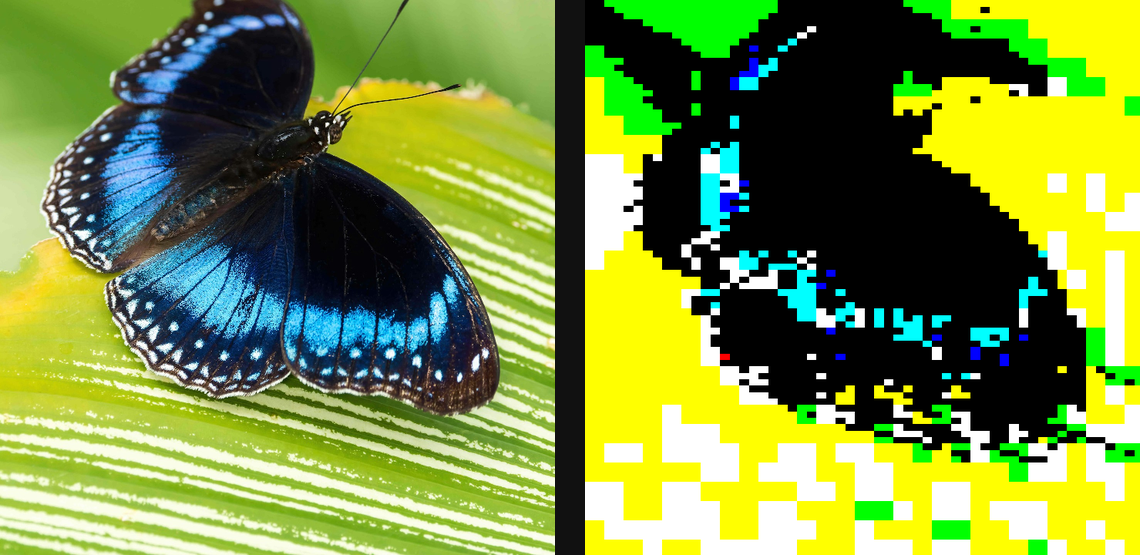
Compare and finish
Toggle the layer eye to compare with the incoming composition. Use the Effect Panel footer for opacity and blend mode, or add a mask to limit the affected area. In Video or Live, use the function menu on a supported control to add keyframes or a driver.
Control reference
Show individual controls
| Control | What it does | Values and animation |
|---|---|---|
| Cell Size | size of each teletext character cell — bigger = chunkier | 0 to 20 %; 1 to 500 px (typed input: 1 to 2000) Default: 3.5 % Continuous keyframes |
| Colour | 8-colour teletext palette, or plain white-on-black | 8 Colour / Mono Default: 8 Colour Discrete keyframes |
| Double Height | stretch the top rows into a tall header look | On / Off Default: Off Discrete keyframes |
| Threshold | brightness cutoff that turns each sixel block on or off | 0 to 1 Default: 0.5 Continuous keyframes |