
Bokeh
Defocus the image with aperture-shaped highlights for soft lens blur and background glow.
Add Bokeh
Open an image or build the source composition first. Put this effect after the content it should process in stack processing order. Choose Optics → Lens → Bokeh in the effects picker, or search for Bokeh with Cmd/Ctrl + F. Select the new layer in Layers to open its Effect Panel.
Choose the defocus
Increase Radius and set Shape, Blades and Rotation for the aperture. Threshold selects bright highlights and Gain controls their contribution.
Set depth response
Expand Depth Field to choose and refine the defocus field. Use its black and white points to change the depth range, then Power and Rim for the highlight appearance.
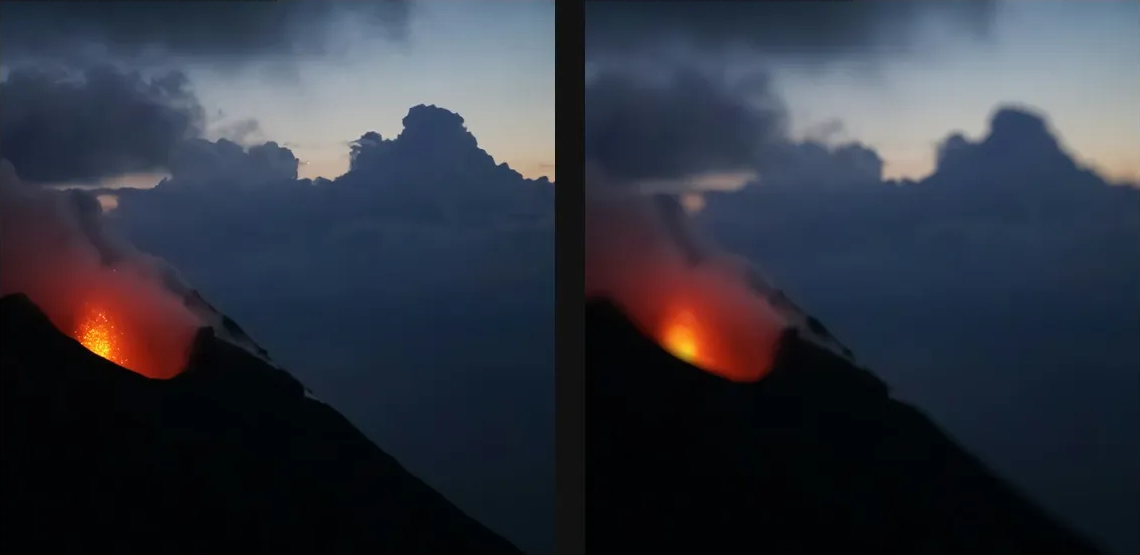
Choose the effect field
Open Depth Field and choose Source Alpha, Source Luminance, Layer Mask, Procedural or Image Map as the Source. Refine its range with Black Point, White Point and Invert. Masking explains the shared field sources, procedural shapes and image-map controls.
Compare and finish
Toggle the layer eye to compare with the incoming composition. Use the Effect Panel footer for opacity and blend mode, or add a mask to limit the affected area. In Video or Live, use the function menu on a supported control to add keyframes or a driver.
Control reference
Show individual controls
| Control | What it does | Values and animation |
|---|---|---|
| Blades | Number of blades shaping the aperture or starburst. | 3 to 12 Default: 6 Discrete keyframes |
| Rotation | Rotates the bokeh aperture. | 0° to 360° Default: 0° Continuous keyframes |
| Shape | Chooses the bokeh aperture shape. | Circle / Hexagon / Octagon / Blades Default: Circle Discrete keyframes |
| Depth Field / Black Point | Input level treated as black by the depth field. | 0 to 1 Default: 0 Continuous keyframes |
| Depth Field / Blur Px | Blurs the depth field before it is used, measured in pixels. | 0 to 64 Default: 0 Continuous keyframes |
| Depth Field / Invert | Reverses the black and white values of the depth field. | On / Off Default: Off Not keyframeable |
| Depth Field / Source / Feather | Softens the procedural depth field shape's boundary. | 0 to 1 Default: 0.05 Continuous keyframes |
| Depth Field / Source / Kind | Chooses source alpha, source luminance, a layer mask, a procedural shape or an image map for the depth field. | Source Alpha / Source Luminance / Layer Mask / Procedural / Image Map Default: procedural Not keyframeable |
| Depth Field / Source / Shape / Center X | Horizontal centre of the procedural depth field shape. | 0 to 1 Default: 0.5 Continuous keyframes |
| Depth Field / Source / Shape / Center Y | Vertical centre of the procedural depth field shape. | 0 to 1 Default: 0.5 Continuous keyframes |
| Depth Field / Source / Shape / Kind | Chooses the procedural shape used to build the depth field. | Radial / Linear / Ellipse / Rectangle Default: radial Not keyframeable |
| Depth Field / Source / Shape / Radius | Radius of the procedural depth field shape. | 0 to 1 Default: 0.5 Continuous keyframes |
| Depth Field / White Point | Input level treated as white by the depth field. | 0 to 1 Default: 1 Continuous keyframes |
| Gain | Amplifies bright highlights before the bokeh blur. | 0 to 8 Default: 4 Continuous keyframes |
| Power | Shapes which source highlights receive bokeh amplification. | 0.5 to 4 Default: 2 Continuous keyframes |
| Threshold | Minimum source luminance that scatters extra light into bright aperture-shaped bokeh discs. | 0% to 100% Default: 70% Continuous keyframes |
| Radius | Radius of the defocus aperture used to blur the source and scatter highlights. | 0 to 20 %; 1 to 500 px (typed input: 1 to 2000) Default: 1.6 % Continuous keyframes |
| Rim | Brightens the boundary of the bokeh aperture samples. | 0 to 2 Default: 0.4 Continuous keyframes |