
Anamorphic Flare
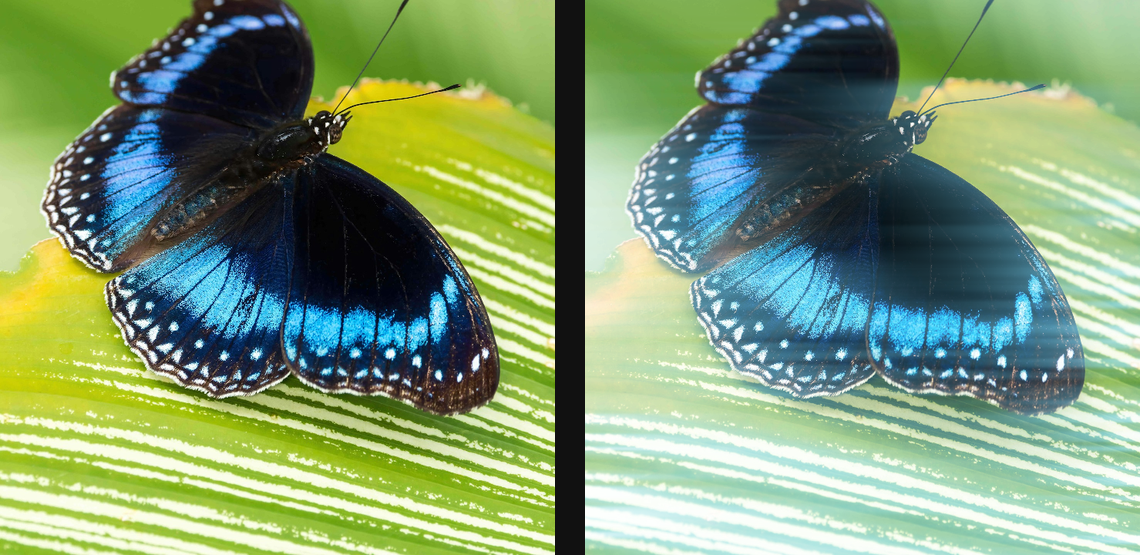
Create horizontal cinematic flare streaks from bright highlights or a positioned source.
Add Anamorphic Flare
Open an image or build the source composition first. Put this effect after the content it should process in stack processing order. Choose Optics → Lens → Flare → Anamorphic Flare in the effects picker, or search for Anamorphic Flare with Cmd/Ctrl + F. Select the new layer in Layers to open its Effect Panel.
Select bright sources
Set Threshold so only the intended highlights produce the flare. Choose Profile and Tint for its optical character.
Shape the streak
Set Angle and Length, then Intensity and Falloff. Adjust Optical Center, Squeeze and the coating or veiling controls to fit the composition.
Set an individual colour
Click the relevant colour swatch to open its picker. Colors and Palettes explains colour values, transparency and the canvas sampling controls where available.
Compare and finish
Toggle the layer eye to compare with the incoming composition. Use the Effect Panel footer for opacity and blend mode, or add a mask to limit the affected area. In Video or Live, use the function menu on a supported control to add keyframes or a driver.
Control reference
Show individual controls
| Control | What it does | Values and animation |
|---|---|---|
| Angle | Rotates the elongated anamorphic light streaks. | 0° to 360° Default: 0° Continuous keyframes |
| Coating | Strength of the coloured lens-coating reflections. | 0% to 100% Default: 85% Continuous keyframes |
| Dirt | Amount of lens-dirt modulation around bright flare regions. | 0% to 100% Default: 10% Continuous keyframes |
| Falloff | Shapes the highlight-mask curve above Threshold; higher values concentrate the flare on brighter source regions. | 1 to 8 Default: 1.5 Continuous keyframes |
| Intensity | Strength of the anamorphic flare generated from source highlights. | 0% to 100% Default: 90% Continuous keyframes |
| Profile | Chooses a lens-flare profile and its optical starting values. | Auto / Clean Spherical / Vintage Spherical / Anamorphic Blue / Dirty Zoom Default: Anamorphic Blue Discrete keyframes |
| Optical Center X | Horizontal optical centre around which lens reflections are arranged. | 0 to 1 Default: 0.5 Continuous keyframes |
| Optical Center Y | Vertical optical centre around which lens reflections are arranged. | 0 to 1 Default: 0.5 Continuous keyframes |
| Squeeze | Sets the horizontal or vertical compression of the flare optics. | 0.5 to 4 Default: 1 Continuous keyframes |
| Length | Length of the anamorphic flare streak. | 1 to 100 %; 5 to 600 px (typed input: 5 to 4000) Default: 60 % Continuous keyframes |
| Threshold | Minimum source brightness that contributes to the anamorphic flare mask. | 0% to 100% Default: 50% Continuous keyframes |
| Tint | Colour tint applied to the elongated anamorphic flare. | Colour Default: #88FFFF Colour keyframes |
| Veiling | Adds a broad low-contrast wash of stray lens light. | 0% to 100% Default: 60% Continuous keyframes |