
Oil Painter
Simplify the image into painterly colour regions that follow its edges and contours.
Add Oil Painter
Open an image or build the source composition first. Put this effect after the content it should process in stack processing order. Choose Texture & Pattern → Paint → Oil Painter in the effects picker, or search for Oil Painter with Cmd/Ctrl + F. Select the new layer in Layers to open its Effect Panel.
Set the stroke scale
Adjust Size and Stroke Scale to match the detail you want to preserve. Use Passes and Smoothing to simplify the source into brush regions.
Shape the paint
Use Bristles, Oil and Sharpness for the mark texture. Increase Relief and adjust Specular or Ambient for an impasto surface. Keep the source recognizable before adding strong relief.
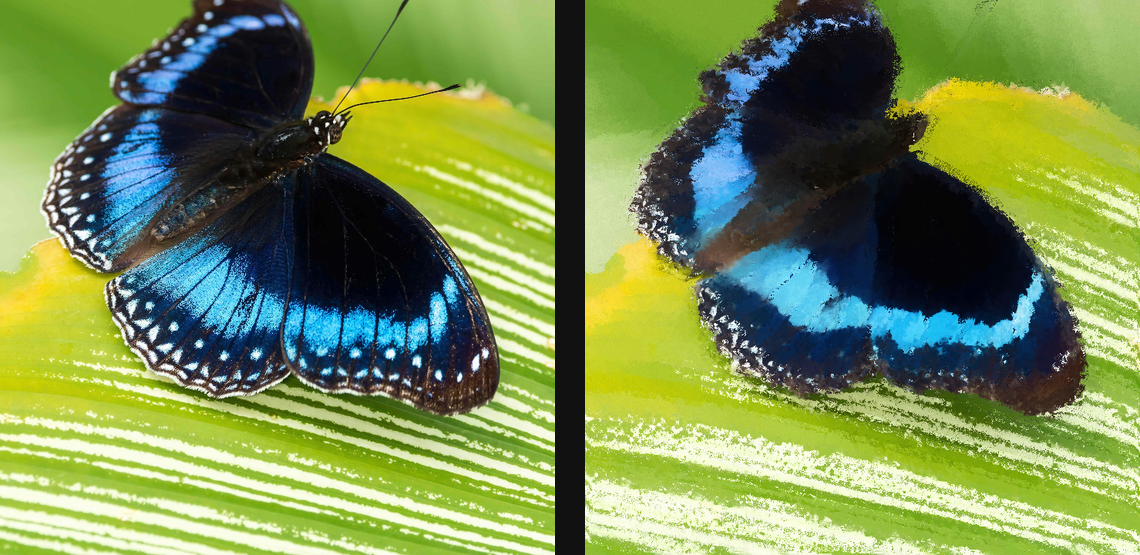
Compare and finish
Toggle the layer eye to compare with the incoming composition. Use the Effect Panel footer for opacity and blend mode, or add a mask to limit the affected area. In Video or Live, use the function menu on a supported control to add keyframes or a driver.
Control reference
Show individual controls
| Control | What it does | Values and animation |
|---|---|---|
| Ambient | Fill light for relief troughs. Lower values deepen impasto shadows. | 0 to 1 Default: 0.92 Continuous keyframes |
| Bristles | Contrast of fine bristle breakup along the local brush tangent. | 0 to 2 Default: 0.48 Continuous keyframes |
| Eccentricity | How stretched the brush footprint becomes along local image structure. | 0 to 4 Default: 1.25 Continuous keyframes |
| Relief | Height of the raised paint surface. 0 keeps bristle colour without relief lighting. | 0 to 1 Default: 0.26 Continuous keyframes |
| Passes | Runs additional full painterly passes. Higher values converge more strongly but are slower. | 1 to 8 Default: 1 Discrete keyframes |
| Size | Brush radius for the structure-aware sector filter. | 0 to 20 %; 1 to 500 px (typed input: 1 to 2000) Default: 0.55 % Continuous keyframes |
| Oil | Overall mix for tangent bristle breakup, source-colour retention, and relief. 0 keeps the legacy Kuwahara output. | 0 to 1 Default: 0.48 Continuous keyframes |
| Sharpness | How strongly each pixel commits to the lowest-variance brush sector. | 0 to 32 Default: 7 Continuous keyframes |
| Specular | Wet-paint highlights on raised bristle ridges. | 0 to 1 Default: 0.18 Continuous keyframes |
| Stroke Scale | Pixel spacing between tangent-aligned bristle strands. | 1 to 48 Default: 7 Continuous keyframes |
| Smoothing | Smooths the structure tensor so brush direction changes over broader, steadier regions. | 0 to 20 %; 1 to 500 px (typed input: 1 to 2000) Default: 0.28 % Continuous keyframes |