
HSV Desync
Separate hue, saturation, and value timing so colour drifts independently from brightness.
Add HSV Desync
Open an image or build the source composition first. Put this effect after the content it should process in stack processing order. Choose Glitch → Channel Drift → HSV Desync in the effects picker, or search for HSV Desync with Cmd/Ctrl + F. Select the new layer in Layers to open its Effect Panel.
Separate colour from tone
Change Hue Shift and Hue Sweep to move the colour independently of the source shading.
Reduce the signal
Adjust Saturation and Value Levels for the chroma strength and tonal stepping. Compare faces or gradients to find a readable balance.
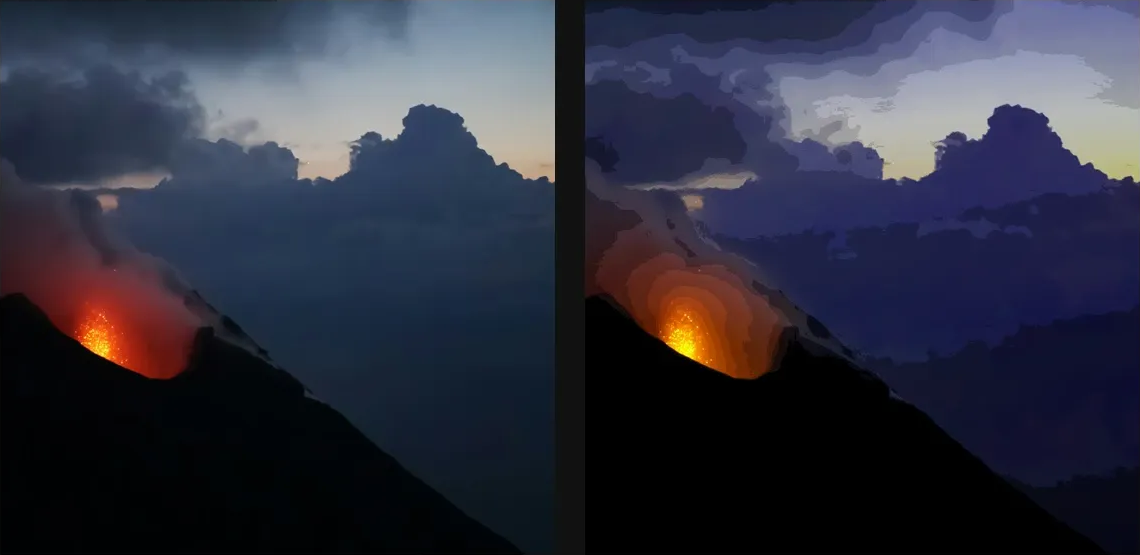
Compare and finish
Toggle the layer eye to compare with the incoming composition. Use the Effect Panel footer for opacity and blend mode, or add a mask to limit the affected area. In Video or Live, use the function menu on a supported control to add keyframes or a driver.
Control reference
Show individual controls
| Control | What it does | Values and animation |
|---|---|---|
| Hue Shift | rotates every hue around the wheel — loops seamlessly at 360 | 0 to 360 Default: 12 Continuous keyframes |
| Hue Sweep | sweeps a rainbow across the frame left to right | 0 to 1 Default: 0.04 Continuous keyframes |
| Saturation | scales saturation — 0 is grey, 2 is oversaturated | 0 to 2 Default: 1.12 Continuous keyframes |
| Value Levels | posterizes brightness into N bands — 0 leaves it smooth | 0 to 16 Default: 12 Discrete keyframes |