
Sample & Hold
Freeze sampled pixels or regions into stepped held values for digital stutter and blocking.
Add Sample & Hold
Open an image or build the source composition first. Put this effect after the content it should process in stack processing order. Choose Glitch → Byte & Color Damage → Sample & Hold in the effects picker, or search for Sample & Hold with Cmd/Ctrl + F. Select the new layer in Layers to open its Effect Panel.
Choose where values hold
Adjust Threshold, Luma Minimum and Luma Maximum to select the sampled tones. Set Hold Rate and Max Hold for how far held values extend.
Shape the streak
Choose Angle and use Length by Luma for tone-dependent lengths. Tune Head Gain, Trail Decay and Warmth after the main held pattern is established.
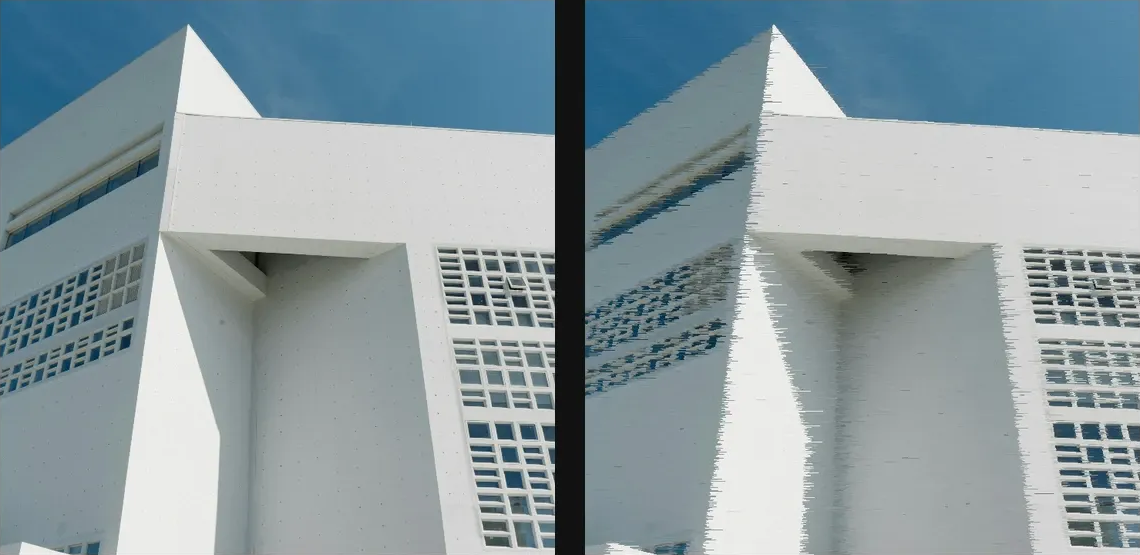
Compare and finish
Toggle the layer eye to compare with the incoming composition. Use the Effect Panel footer for opacity and blend mode, or add a mask to limit the affected area. In Video or Live, use the function menu on a supported control to add keyframes or a driver.
Control reference
Show individual controls
| Control | What it does | Values and animation |
|---|---|---|
| Angle | direction the frozen-pixel streaks run | 0° to 360° Default: 0° Continuous keyframes |
| Trail Decay | Fade held colour back toward the source along the trail | 0% to 100% Default: 0% Continuous keyframes |
| Head Gain | Lift the brightness of each new comet head | 0% to 100% Default: 0% Continuous keyframes |
| Length by Luma | Make dark heads generate longer trails | 0% to 100% Default: 0% Continuous keyframes |
| Luma Maximum | Upper luminance limit of source pixels eligible for sample-and-hold streaks; paired with Hold Luma Min. | 0% to 100% Default: 100% Continuous keyframes |
| Luma Minimum | Only pixels inside the luma interval can start a held trail | 0% to 100% Default: 0% Continuous keyframes |
| Hold Rate | how long each pixel stays frozen — higher = longer streaks | 0% to 100% Default: 82% Continuous keyframes |
| Threshold | how much contrast breaks a hold — lower freezes through edges | 0% to 100% Default: 45% Continuous keyframes |
| Warmth | Add warm red and subtract blue toward the tail | 0% to 100% Default: 0% Continuous keyframes |
| Max Hold | longest a streak can run before it re-samples | 0 to 100 %; 1 to 2000 px (typed input: 1 to 8000) Default: 14 % Continuous keyframes |
| Seed | change for a different random pattern | 0 to 9999 Default: 0 Discrete keyframes |