
Data Mosh
Shift, repeat, and smear macroblock-like chunks for synthetic datamosh breakdown.
Add Data Mosh
Open an image or build the source composition first. Put this effect after the content it should process in stack processing order. Choose Glitch → Data Mosh in the effects picker, or search for Data Mosh with Cmd/Ctrl + F. Select the new layer in Layers to open its Effect Panel.
Choose the blocks
Set Block Size and Motion Source, then Motion Amount for the displacement. Seed and Noise Scale change a generated motion field.
Build the corruption
Increase Iterations and Trail, then tune I-Frame Rate or Loop for the constructed breakdown. This version processes the current image; choose Frame Mosh for carry-over from actual preceding frames.
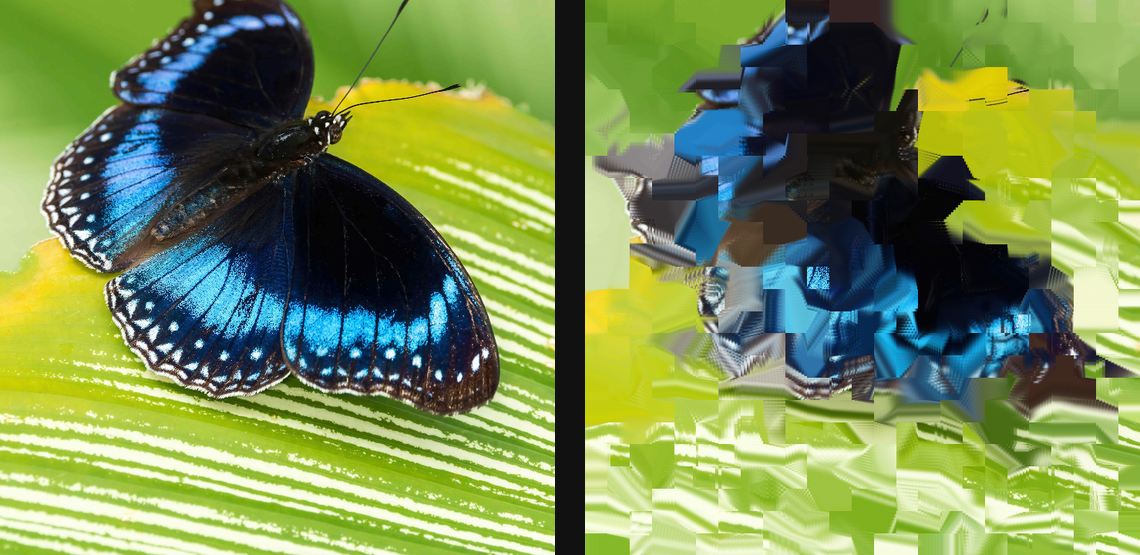
Compare and finish
Toggle the layer eye to compare with the incoming composition. Use the Effect Panel footer for opacity and blend mode, or add a mask to limit the affected area. In Video or Live, use the function menu on a supported control to add keyframes or a driver.
Control reference
Show individual controls
| Control | What it does | Values and animation |
|---|---|---|
| Loop | loop phase — keyframe 0 to 1 for a seamless looping drift | 0 to 1 Default: 0 Continuous keyframes |
| Loop Range | drift radius of the loop — 0 keeps the field static | 0 to 10 Default: 0 Continuous keyframes |
| I-Frame Rate | how often blocks snap back to the original — the keyframe punch-through | 0% to 100% Default: 4% Continuous keyframes |
| Block Size | macroblock size — the chunkiness of the codec melt | 0 to 20 %; 1 to 500 px (typed input: 1 to 2000) Default: 4 % Continuous keyframes |
| Iterations | how many P-frames to compound — longer = more melt | 0 to 120 Default: 24 Discrete keyframes |
| Motion Amount | how far each macroblock slides per frame | 0 to 20 %; 1 to 500 px (typed input: 1 to 2000) Default: 0.6 % Continuous keyframes |
| Motion Source | gradient slides blocks along edges; perlin drifts them in a flow | Gradient / Perlin Default: Gradient Discrete keyframes |
| Noise Scale | feature size of the perlin motion field — bigger = lazier drift | 0.5 to 30 Default: 4 Continuous keyframes |
| Seed | change for a different random pattern | 0 to 9999 Default: 0 Discrete keyframes |
| Trail | how much of the previous frame ghosts into each step | 0% to 100% Default: 15% Continuous keyframes |