
Halation
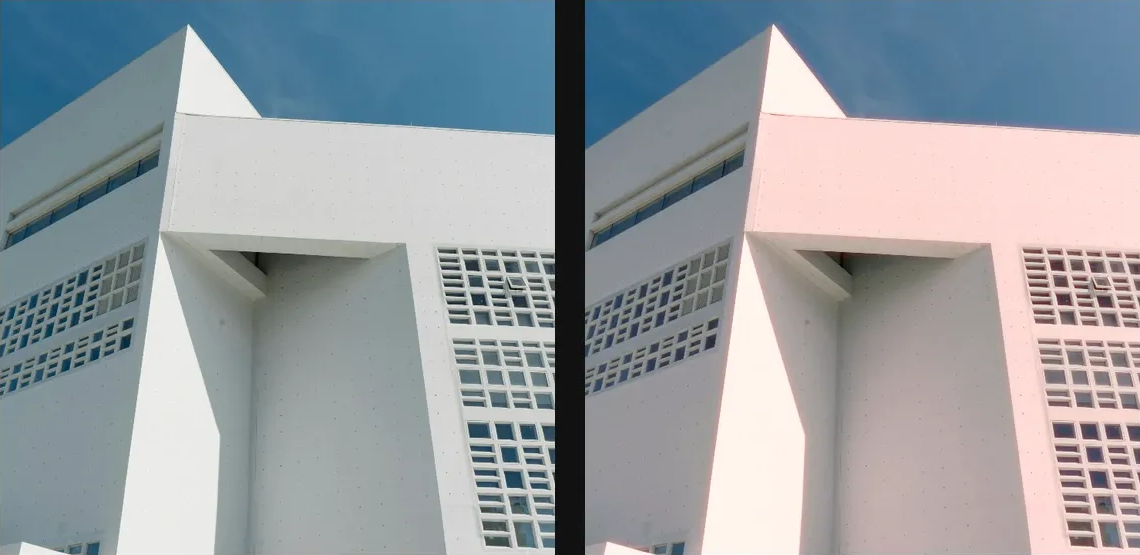
Add warm red-orange bloom around bright edges, mimicking film halation and overexposed highlights.
Add Halation
Open an image or build the source composition first. Put this effect after the content it should process in stack processing order. Choose Optics → Light → Glow → Halation in the effects picker, or search for Halation with Cmd/Ctrl + F. Select the new layer in Layers to open its Effect Panel.
Select the light
Set Threshold to choose the bright edges that bleed. Choose Color for the halo, then Radius and Falloff for its size and reach.
Balance the glow
Compare with the layer eye. Increase Intensity gradually and retain detail in bright areas. Use footer opacity or a mask to keep the treatment under control.
Set an individual colour
Click the relevant colour swatch to open its picker. Colors and Palettes explains colour values, transparency and the canvas sampling controls where available.
Compare and finish
Toggle the layer eye to compare with the incoming composition. Use the Effect Panel footer for opacity and blend mode, or add a mask to limit the affected area. In Video or Live, use the function menu on a supported control to add keyframes or a driver.
Control reference
Show individual controls
| Control | What it does | Values and animation |
|---|---|---|
| Color | Colour of the light halo that spreads around bright source regions. | Colour Default: #FF6644 Colour keyframes |
| Falloff | Shapes the highlight-mask curve above Threshold; higher values restrict halation more strongly to bright highlights. | 1 to 8 Default: 1.5 Continuous keyframes |
| Intensity | Strength of the coloured halation light around extracted highlights. | 0% to 100% Default: 90% Continuous keyframes |
| Radius | Spread of the coloured halation halo around bright source regions. | 0.1 to 50 %; 1 to 400 px (typed input: 1 to 2000) Default: 30 % Continuous keyframes |
| Threshold | Minimum source brightness that produces the coloured halation halo. | 0% to 100% Default: 50% Continuous keyframes |