
Pixel Art
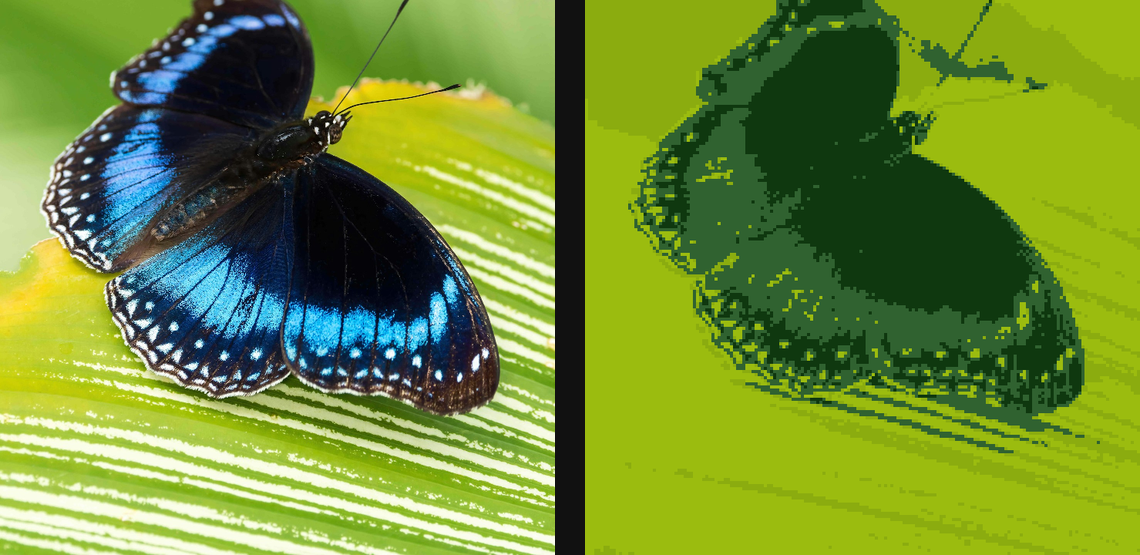
Reduce detail into crisp low-resolution pixel-art blocks while preserving a stylized source read.
Add Pixel Art
Open an image or build the source composition first. Put this effect after the content it should process in stack processing order. Choose Texture & Pattern → Pixel → Pixel Art in the effects picker, or search for Pixel Art with Cmd/Ctrl + F. Select the new layer in Layers to open its Effect Panel.
Set the pixel scale
Increase Pixel Size to establish the coarse image grid, then choose Palette or edit Stops for the available colours.
Balance tone and dither
Use Palette Count, Bands and Tone Gamma to retain the subject. Enable Dither and choose Pattern when gradients need dotted transitions; Dither Strength controls that contribution.
Edit the shared palette
Open the Palette section to choose and edit the colour set. Colors and Palettes explains adding and moving stops, editing colour and opacity, extracting colours and saving a palette for reuse.
Compare and finish
Toggle the layer eye to compare with the incoming composition. Use the Effect Panel footer for opacity and blend mode, or add a mask to limit the affected area. In Video or Live, use the function menu on a supported control to add keyframes or a driver.
Control reference
Show individual controls
| Control | What it does | Values and animation |
|---|---|---|
| Dither | Add an ordered screen for shaded gradients instead of crisp blocks | On / Off Default: Off Discrete keyframes |
| Pattern | Chooses the threshold matrix used by the pixel-art dither. | Bayer 2×2 / Bayer 4×4 / Bayer 8×8 / Blue Noise Default: Bayer 4×4 Discrete keyframes |
| Palette | Chooses the gradient or discrete palette used for colour quantization. | Available presets Default: gameboy Discrete keyframes |
| Palette Count | Number of colours requested when extracting the Pixel Art palette from the source image. | 2 to 32 Default: 8 Continuous keyframes |
| Cycle | Rotate the palette colours. Keyframe 0→1 for a seamless colour-cycling loop. | 0 to 1 Default: 0 Continuous keyframes |
| Distance | Palette matching metric | RGB / Weighted RGB / Luminance / OKLab Default: RGB Discrete keyframes |
| Dither Strength | Amount of ordered screen mixed into the blocks | 0% to 100% Default: 100% Continuous keyframes |
| Tone Gamma | Tone response before palette mapping | 0.1 to 4 Default: 1 Continuous keyframes |
| Bands | How sampled palettes map to tones | Even / Luminance Default: Even Discrete keyframes |
| Pixel Size | Chunky block size — bigger is more 8-bit | 0 to 20 %; 1 to 500 px (typed input: 1 to 2000) Default: 0.6 % Continuous keyframes |
| Stops | Editable palette stops. Change their position, colour or opacity to reshape the quantized palette. | Gradient stops Default: None Not keyframeable |