
Prismatic Refraction
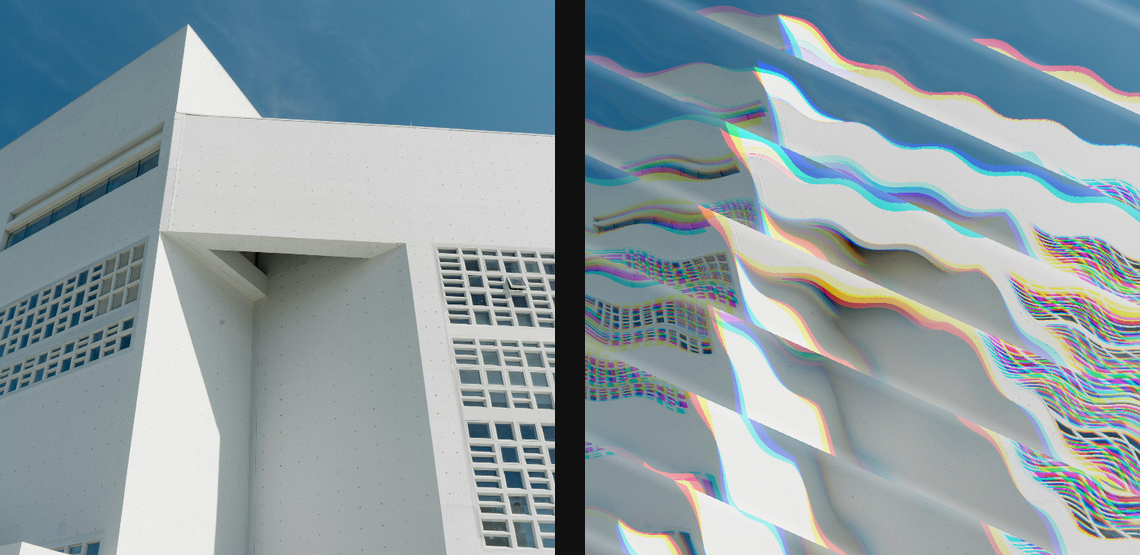
Split the image through faceted prism planes with RGB dispersion and cut-crystal bends.
Add Prismatic Refraction
Open an image or build the source composition first. Put this effect after the content it should process in stack processing order. Choose Material → Glass → Prismatic Refraction in the effects picker, or search for Prismatic Refraction with Cmd/Ctrl + F. Select the new layer in Layers to open its Effect Panel.
Build the prism
Set Center X and Center Y, then Facets and Angle for the prism structure. Increase Strength to bend the image through the planes.
Add optical detail
Use Dispersion for RGB separation, Shift for the plane offset and Bevel for its edge treatment. Choose Edge for outside-image sampling.
Choose the effect field
Open Effect Area and choose Source Alpha, Source Luminance, Layer Mask, Procedural or Image Map as the Source. Refine its range with Black Point, White Point and Invert. Masking explains the shared field sources, procedural shapes and image-map controls.
Compare and finish
Toggle the layer eye to compare with the incoming composition. Use the Effect Panel footer for opacity and blend mode, or add a mask to limit the affected area. In Video or Live, use the function menu on a supported control to add keyframes or a driver.
Control reference
Show individual controls
| Control | What it does | Values and animation |
|---|---|---|
| Center X | horizontal position of the centre | 0 to 1 Default: 0.5 Continuous keyframes |
| Center Y | vertical position of the centre | 0 to 1 Default: 0.5 Continuous keyframes |
| Edge | how off-canvas source samples are filled | Clamp / Wrap / Mirror / Transparent Default: Clamp Discrete keyframes |
| Angle | direction the prism plates refract across the image | 0° to 360° Default: 24° Continuous keyframes |
| Bevel | width and brightness of lit facet seams | 0% to 100% Default: 62% Continuous keyframes |
| Dispersion | splits red and blue refraction through each plate | 0% to 100% Default: 62% Continuous keyframes |
| Facets | number of prism bands or wedges | 2 to 64 Default: 9 Discrete keyframes |
| Shift | slides the facet phase; animate 0 to 1 for a loop | 0 to 1 Default: 0 Continuous keyframes |
| Strength | maximum faceted source-pixel displacement | 0% to 100% Default: 52% Continuous keyframes |