
Broken Glass
Add spider-web cracks, shard displacement, gaps, and impact-driven glass damage.
Add Broken Glass
Open an image or build the source composition first. Put this effect after the content it should process in stack processing order. Choose Material → Damage → Broken Glass in the effects picker, or search for Broken Glass with Cmd/Ctrl + F. Select the new layer in Layers to open its Effect Panel.
Place the impact
Set Impact X and Impact Y, then Count, Length and Radial Bias for the main cracks. Change Seed for a new fracture layout.
Break the panes
Use Shards, Displacement, Rotation and Gap to separate regions. Tune crack Thickness, Highlight and Shadow for readable fracture edges.
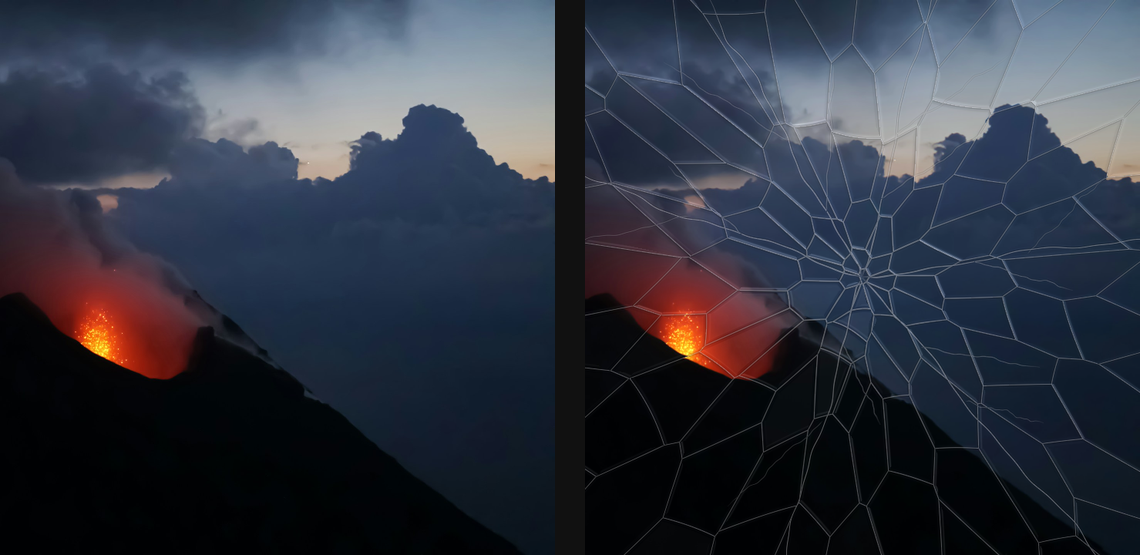
Compare and finish
Toggle the layer eye to compare with the incoming composition. Use the Effect Panel footer for opacity and blend mode, or add a mask to limit the affected area. In Video or Live, use the function menu on a supported control to add keyframes or a driver.
Control reference
Show individual controls
| Control | What it does | Values and animation |
|---|---|---|
| Impact Radius | reach of the dense impact region; fractures continue to the canvas edges | 5% to 200% Default: 60% Continuous keyframes |
| Amount | irregular thickness modulation along crack lines | 0% to 100% Default: 30% Continuous keyframes |
| Frequency | scale of the crack-line texture noise | 0.005 to 0.2 (typed input: 0.005 to 0.3) Default: 0.04 Continuous keyframes |
| Thickness | base width of the crack near the impact | 0 to 10 %; 1 to 256 px (typed input: 1 to 1000) Default: 0.16 % Continuous keyframes |
| Color | solid colour used when gap fill is Solid Color | RGBA colour (0 to 255 per channel) Default: RGBA (0, 0, 0, 255) Colour keyframes |
| Fill | what fills the space between separated shards | Transparent / Solid Color / Crack Color Default: Transparent Discrete keyframes |
| Highlight | brightness of the refractive crack highlight | 0% to 100% Default: 65% Continuous keyframes |
| Impact X | horizontal position of the impact point | 0 to 1 Default: 0.5 Continuous keyframes |
| Impact Y | vertical position of the impact point | 0 to 1 Default: 0.5 Continuous keyframes |
| Min Thickness | minimum far-edge crack width | 0 to 10 %; 1 to 256 px (typed input: 1 to 1000) Default: 0.035 % Continuous keyframes |
| Radial Bias | how tightly shard seeds bunch near the impact | 0% to 100% Default: 80% Continuous keyframes |
| Count | number of long primary cracks radiating outward | 0 to 16 Default: 6 Discrete keyframes |
| Jaggedness | amount of wandering in the long radial cracks | 0 to 50 %; 0 to 256 px (typed input: 0 to 2000) Default: 0.25 % Continuous keyframes |
| Length | how far the long radial cracks travel | 10% to 300% Default: 180% Continuous keyframes |
| Seed | change for a different random pattern | 0 to 9999 Default: 0 Discrete keyframes |
| Shadow | dark inset strength beside cracks | 0% to 100% Default: 35% Continuous keyframes |
| Shadow Width | width of the dark shoulder around cracks | 0 to 10 %; 1 to 256 px (typed input: 1 to 1000) Default: 0.06 % Continuous keyframes |
| Shards | density of shards across the pane; zero disables the shard field | 0 to 300 (typed input: 0 to 400) Default: 70 Discrete keyframes |
| Displacement | how far each shard shifts its source pixels | 0 to 50 %; 0 to 256 px (typed input: 0 to 2000) Default: 0.7 % Continuous keyframes |
| Gap | space inset between neighbouring shards | 0 to 10 %; 1 to 256 px (typed input: 1 to 1000) Default: 0 % Continuous keyframes |
| Shard Light Angle | direction of the key light over the shards | 0 to 360 Default: 135 Continuous keyframes |
| Relief | height of the virtual tilted glass plates and refraction | 0 to 1 Default: 0.22 Continuous keyframes |
| Rotation | maximum per-shard rotation | 0° to 15° (typed input: 0° to 30°) Default: 0.7° Continuous keyframes |
| Specular | strength of glossy highlights, dispersion, and rim glints | 0 to 1 Default: 0.55 Continuous keyframes |
| Falloff | how quickly cracks thin away from the impact | 5% to 200% Default: 35% Continuous keyframes |