
LED / LCD
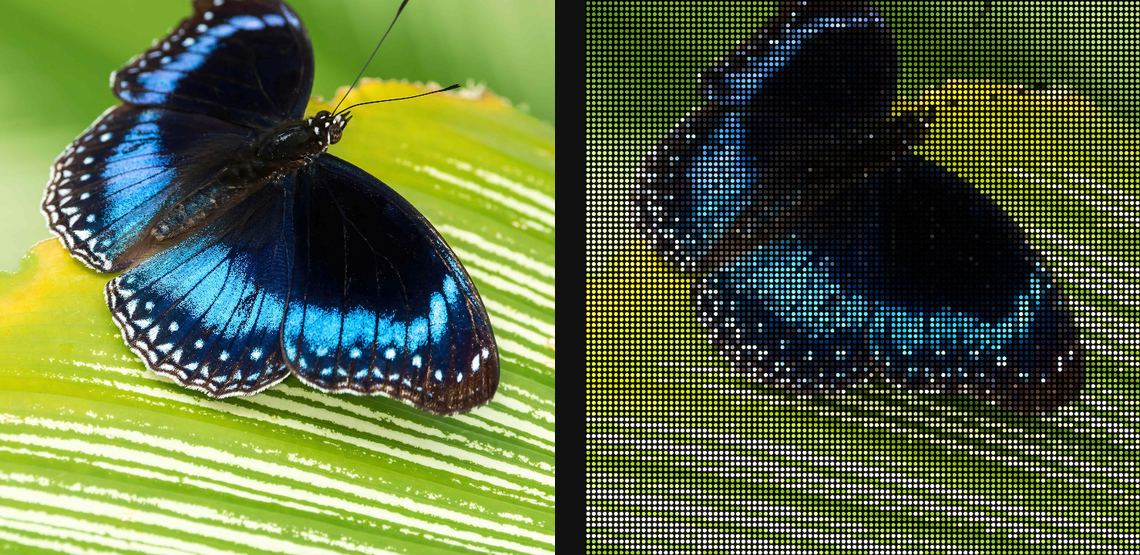
Render flat-panel LED matrices or LCD RGB stripes with gaps, bloom, and backlight effects.
Add LED / LCD
Open an image or build the source composition first. Put this effect after the content it should process in stack processing order. Choose Optics → Display → LED / LCD in the effects picker, or search for LED / LCD with Cmd/Ctrl + F. Select the new layer in Layers to open its Effect Panel.
Choose the panel
Set Type and Emitter, then Pixel Pitch and Gap for the visible pixel structure.
Balance the light
Adjust Intensity, Bloom and Backlight Bleed. Use Response Ghosting when you want display-response persistence, and check the fine emitter pattern at full quality.
Set an individual colour
Click the relevant colour swatch to open its picker. Colors and Palettes explains colour values, transparency and the canvas sampling controls where available.
Compare and finish
Toggle the layer eye to compare with the incoming composition. Use the Effect Panel footer for opacity and blend mode, or add a mask to limit the affected area. In Video or Live, use the function menu on a supported control to add keyframes or a driver.
Control reference
Show individual controls
| Control | What it does | Values and animation |
|---|---|---|
| Backlight Bleed | Adds the uneven edge illumination of an LCD backlight. | 0% to 100% Default: 15% Continuous keyframes |
| Bloom | Adds a glow extracted from bright screen pixels. | 0% to 200% Default: 35% Continuous keyframes |
| Bloom Radius | Sets how far the extracted screen glow spreads. | 0 to 100 %; 1 to 2000 px (typed input: 1 to 8000) Default: 0.4 % Continuous keyframes |
| Saturation | Controls how much source color remains in the screen glow. | 0% to 200% Default: 100% Continuous keyframes |
| Soft Knee | Softens the transition into the screen-glow threshold. | 0% to 100% Default: 15% Continuous keyframes |
| Threshold | Chooses how bright a pixel must be to contribute to screen glow. | 0% to 100% Default: 55% Continuous keyframes |
| Tint | Tints the extracted screen glow. | Colour Default: #FFFFFF Colour keyframes |
| Gap | Changes the dark gap between adjacent display cells. | 0% to 90% Default: 30% Continuous keyframes |
| Emitter | Chooses the shape of each simulated display emitter. | Round / Square Default: Round Not keyframeable |
| Intensity | Mixes the complete simulated display with the original picture. | 0% to 100% Default: 100% Continuous keyframes |
| Type | Chooses the simulated LED or LCD panel structure. | LED Matrix / LCD Stripes Default: LED Matrix Not keyframeable |
| Pixel Pitch | Sets the spacing of the simulated display cells. | 0 to 20 %; 1 to 500 px (typed input: 1 to 2000) Default: 1 % Continuous keyframes |
| Response Ghosting | Adds the spatial response smear of a simulated LCD panel. | 0% to 100% Default: 30% Continuous keyframes |
| Seed | Selects a repeatable realization of the display noise and damage. | 0 to 9999 Default: 0 Discrete keyframes |