
Caustic Glass
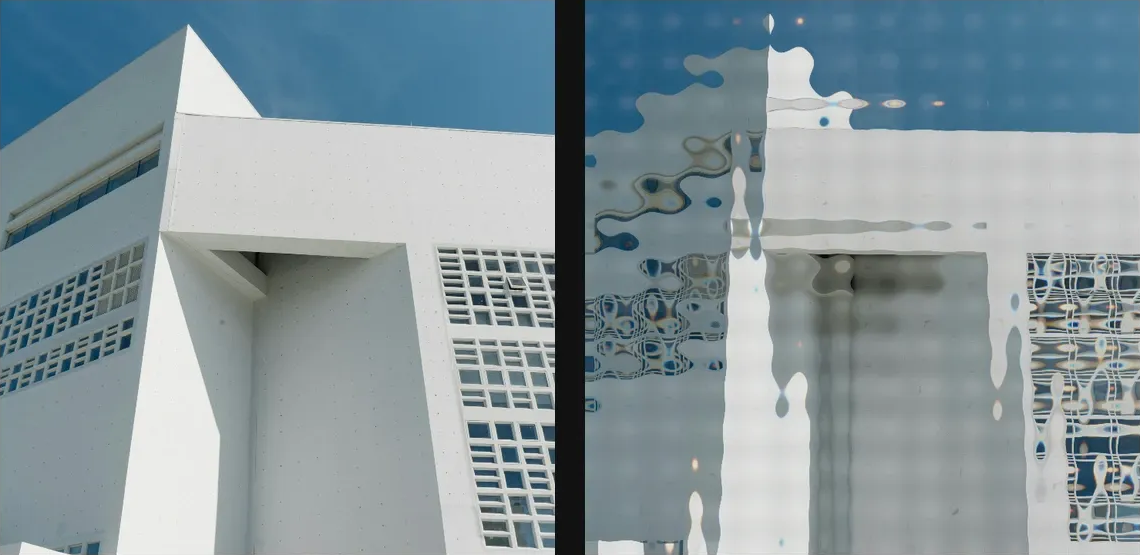
Refract the image through animated glass height fields with focused caustic light streaks.
Add Caustic Glass
Open an image or build the source composition first. Put this effect after the content it should process in stack processing order. Choose Material → Glass → Caustic Glass in the effects picker, or search for Caustic Glass with Cmd/Ctrl + F. Select the new layer in Layers to open its Effect Panel.
Shape the glass field
Set Scale, Seed, Flow and Angle for the glass surface. Increase Refraction to bend the source and Relief to reveal its height.
Focus the light
Adjust Caustics, Sharpness and Light Angle for the bright focused streaks. Tune Ambient and Specular afterward; Dispersion separates colours.
Compare and finish
Toggle the layer eye to compare with the incoming composition. Use the Effect Panel footer for opacity and blend mode, or add a mask to limit the affected area. In Video or Live, use the function menu on a supported control to add keyframes or a driver.
Control reference
Show individual controls
| Control | What it does | Values and animation |
|---|---|---|
| Ambient | minimum light level on shaded caustic normals | 0 to 1 Default: 0.48 Continuous keyframes |
| Angle | orientation of the caustic waves and refraction — 0° is horizontal, 90° is vertical | 0° to 360° Default: 0° Continuous keyframes |
| Dispersion | RGB colour split through the refracted caustic normals | 0% to 100% Default: 18% Continuous keyframes |
| Flow | seamless loop phase for the animated caustic field | 0% to 100% Default: 0% Continuous keyframes |
| Flow Depth | radius of the closed-loop caustic drift | 0 to 3 Default: 0.65 Continuous keyframes |
| Caustic Light Angle | direction of the key light over the caustic normals | 0 to 360 Default: 130 Continuous keyframes |
| Refraction | how far the generated normals bend the source image | 0 to 50 %; 0 to 256 px (typed input: 0 to 2000) Default: 20 % Continuous keyframes |
| Relief | height of the generated glass/water normal field | 0 to 1 Default: 0.5 Continuous keyframes |
| Scale | feature size of the refractive caustic field | 0 to 100 %; 1 to 500 px (typed input: 1 to 2000) Default: 12 % Continuous keyframes |
| Sharpness | how narrow and concentrated the caustic streaks become | 0% to 100% Default: 62% Continuous keyframes |
| Specular | strength of glossy highlights on the caustic surface | 0 to 1 Default: 0.62 Continuous keyframes |
| Caustics | brightness of the focused caustic light streaks | 0% to 100% Default: 72% Continuous keyframes |
| Seed | change for a different random pattern | 0 to 9999 Default: 0 Discrete keyframes |