
Scanline Refraction
Bend scanlines through a refractive map for spectral line displacement and RGB scan drift.
Add Scanline Refraction
Open an image or build the source composition first. Put this effect after the content it should process in stack processing order. Choose Glitch → Scanline Refraction in the effects picker, or search for Scanline Refraction with Cmd/Ctrl + F. Select the new layer in Layers to open its Effect Panel.
Choose the scan geometry
Set Scan Direction and Line Direction, then Line Spacing and Line Offset.
Bend the lines
Increase Strength to reveal the refractive displacement. Compare fine colour edges and use opacity to mix some of the original image back in.
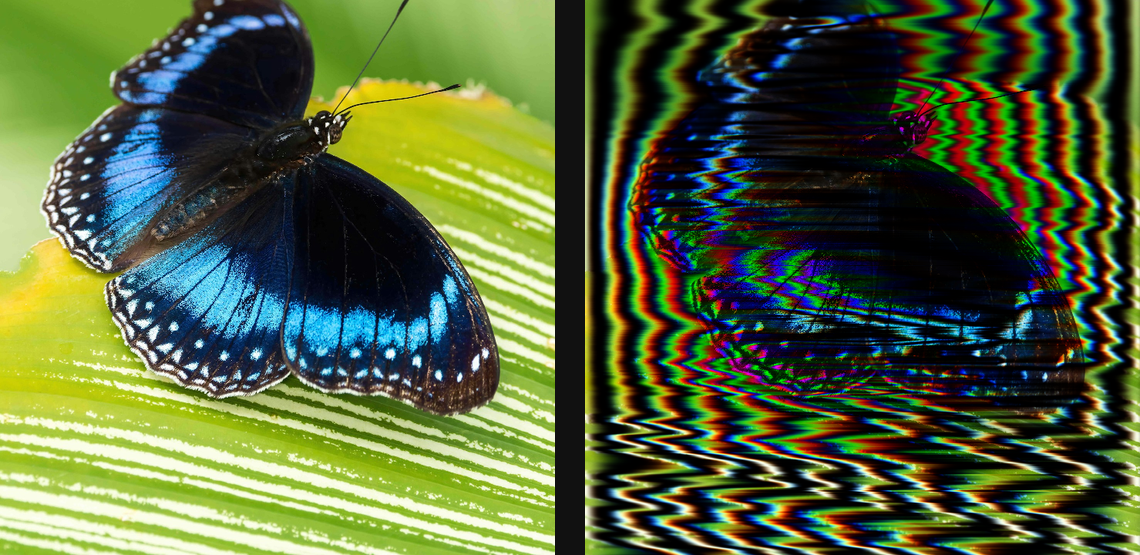
Compare and finish
Toggle the layer eye to compare with the incoming composition. Use the Effect Panel footer for opacity and blend mode, or add a mask to limit the affected area. In Video or Live, use the function menu on a supported control to add keyframes or a driver.
Control reference
Show individual controls
| Control | What it does | Values and animation |
|---|---|---|
| Line Direction | Orientation of the carrier scanlines before luminance-driven spectral bending. | 0° to 360° Default: 0° Continuous keyframes |
| Line Offset | Shifts the refracting scanline grid across the source. | 0 to 1 Default: 0 Continuous keyframes |
| Line Spacing | Sets the distance between refracting scanlines. | 0 to 100 %; 1 to 2000 px (typed input: 1 to 8000) Default: 11 % Continuous keyframes |
| Strength | Scales luminance-driven bending and RGB separation of the refraction scanlines. | 0% to 100% Default: 42% Continuous keyframes |
| Scan Direction | Direction along which source luminance is accumulated to bend the carrier lines; independent of Line Direction. | 0° to 360° Default: 0° Continuous keyframes |