
Image Adjustments
Adjust exposure, contrast, curves, and colour together in one layer.
Add Image Adjustments
Open an image or build the source composition first. Put this effect after the content it should process in stack processing order. Choose Image Adjustments → Image Adjustments in the effects picker, or search for Image Adjustments with Cmd/Ctrl + F. Select the new layer in Layers to open its Effect Panel.
Enable an adjustment
Open the section you need and enable it. Start with Exposure or Levels for overall tone; use the section toggle to compare that adjustment on its own.
Shape tone and colour
In Curves, choose a channel and add or drag curve points. Use Hue / Saturation, Color Balance or Selective Color for targeted changes. The sections process in their fixed order.
Refine the grade
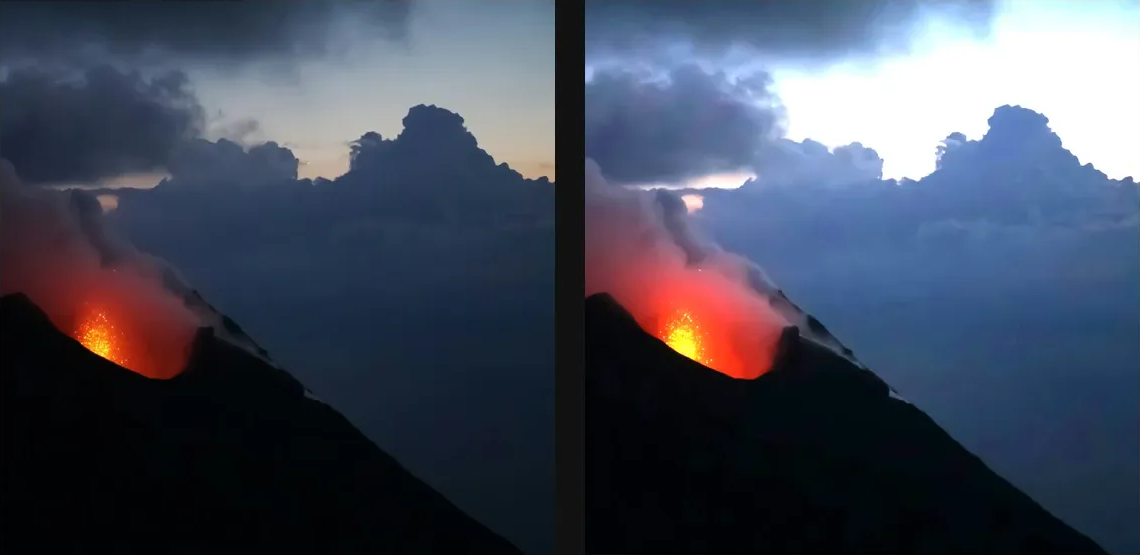
Make small changes and compare the whole correction layer with its eye. Use its mask for local correction and footer opacity for the overall mix.
Compare and finish
Toggle the layer eye to compare with the incoming composition. Use the Effect Panel footer for opacity and blend mode, or add a mask to limit the affected area. In Video or Live, use the function menu on a supported control to add keyframes or a driver.
Control reference
Show individual controls
| Control | What it does | Values and animation |
|---|---|---|
| Black And White / Blues | brightness contribution from blue regions | -200 to 300 Default: 20 Continuous keyframes |
| Black And White / Cyans | brightness contribution from cyan regions | -200 to 300 Default: 60 Continuous keyframes |
| Black And White / Greens | brightness contribution from green regions | -200 to 300 Default: 40 Continuous keyframes |
| Black And White / Magentas | brightness contribution from magenta regions | -200 to 300 Default: 80 Continuous keyframes |
| Black And White / Reds | brightness contribution from red regions | -200 to 300 Default: 40 Continuous keyframes |
| Tint Blue | Blue component of the black-and-white toning colour. | 0 to 255 Default: 0 Discrete keyframes |
| Tint Green | Green component of the black-and-white toning colour. | 0 to 255 Default: 0 Discrete keyframes |
| Tint Red | Red component of the black-and-white toning colour. | 0 to 255 Default: 0 Discrete keyframes |
| Tint Strength | how much of the tint colour blends into the greyscale | 0 to 1 Default: 0 Continuous keyframes |
| Black And White / Yellows | brightness contribution from yellow regions | -200 to 300 Default: 60 Continuous keyframes |
| Brightness | positive lightens, negative darkens | -100 to 100 Default: 0 Continuous keyframes |
| Contrast | positive expands tonal range, negative flattens it | -100 to 100 Default: 0 Continuous keyframes |
| Channel Mixer / Monochrome | single greyscale output using the Mono Mix weights | On / Off Default: Off Not keyframeable |
| Channel Mixer / Output Blue / Blue | Weights source blue in the blue output channel. | -200 to 200 Default: 100 Continuous keyframes |
| Channel Mixer / Output Blue / Constant | Adds a constant offset to the blue output channel. | -100 to 100 Default: 0 Continuous keyframes |
| Channel Mixer / Output Blue / Green | Weights source green in the blue output channel. | -200 to 200 Default: 0 Continuous keyframes |
| Channel Mixer / Output Blue / Red | Weights source red in the blue output channel. | -200 to 200 Default: 0 Continuous keyframes |
| Channel Mixer / Output Green / Blue | Weights source blue in the green output channel. | -200 to 200 Default: 0 Continuous keyframes |
| Channel Mixer / Output Green / Constant | Adds a constant offset to the green output channel. | -100 to 100 Default: 0 Continuous keyframes |
| Channel Mixer / Output Green / Green | Weights source green in the green output channel. | -200 to 200 Default: 100 Continuous keyframes |
| Channel Mixer / Output Green / Red | Weights source red in the green output channel. | -200 to 200 Default: 0 Continuous keyframes |
| Channel Mixer / Output Mono / Blue | Weights source blue in the mono output channel. | -200 to 200 Default: 20 Continuous keyframes |
| Channel Mixer / Output Mono / Constant | Adds a constant offset to the mono output channel. | -100 to 100 Default: 0 Continuous keyframes |
| Channel Mixer / Output Mono / Green | Weights source green in the mono output channel. | -200 to 200 Default: 40 Continuous keyframes |
| Channel Mixer / Output Mono / Red | Weights source red in the mono output channel. | -200 to 200 Default: 40 Continuous keyframes |
| Channel Mixer / Output Red / Blue | Weights source blue in the red output channel. | -200 to 200 Default: 0 Continuous keyframes |
| Channel Mixer / Output Red / Constant | Adds a constant offset to the red output channel. | -100 to 100 Default: 0 Continuous keyframes |
| Channel Mixer / Output Red / Green | Weights source green in the red output channel. | -200 to 200 Default: 0 Continuous keyframes |
| Channel Mixer / Output Red / Red | Weights source red in the red output channel. | -200 to 200 Default: 100 Continuous keyframes |
| Color Balance / Highlights / Cyan Red | negative pushes cyan, positive pushes red | -100 to 100 Default: 0 Continuous keyframes |
| Color Balance / Highlights / Magenta Green | negative pushes magenta, positive pushes green | -100 to 100 Default: 0 Continuous keyframes |
| Color Balance / Highlights / Yellow Blue | negative pushes yellow, positive pushes blue | -100 to 100 Default: 0 Continuous keyframes |
| Color Balance / Midtones / Cyan Red | negative pushes cyan, positive pushes red | -100 to 100 Default: 0 Continuous keyframes |
| Color Balance / Midtones / Magenta Green | negative pushes magenta, positive pushes green | -100 to 100 Default: 0 Continuous keyframes |
| Color Balance / Midtones / Yellow Blue | negative pushes yellow, positive pushes blue | -100 to 100 Default: 0 Continuous keyframes |
| Color Balance / Preserve Luminosity | keep original brightness after the colour shift | On / Off Default: On Not keyframeable |
| Color Balance / Shadows / Cyan Red | negative pushes cyan, positive pushes red | -100 to 100 Default: 0 Continuous keyframes |
| Color Balance / Shadows / Magenta Green | negative pushes magenta, positive pushes green | -100 to 100 Default: 0 Continuous keyframes |
| Color Balance / Shadows / Yellow Blue | negative pushes yellow, positive pushes blue | -100 to 100 Default: 0 Continuous keyframes |
| Channel | which channel the curve reshapes — L preserves hue | RGB / Red / Green / Blue / Luminance Default: RGB Discrete keyframes |
| Curves / Points | Editable input/output tone-curve points for the selected channel. Move points to remap source tones. | Editable collection Default: 2 entries Not keyframeable |
| Curves / Points B | Editable input/output tone-curve points for the selected channel. Move points to remap source tones. | Editable collection Default: 2 entries Not keyframeable |
| Curves / Points G | Editable input/output tone-curve points for the selected channel. Move points to remap source tones. | Editable collection Default: 2 entries Not keyframeable |
| Curves / Points L | Editable input/output tone-curve points for the selected channel. Move points to remap source tones. | Editable collection Default: 2 entries Not keyframeable |
| Curves / Points R | Editable input/output tone-curve points for the selected channel. Move points to remap source tones. | Editable collection Default: 2 entries Not keyframeable |
| Curves / Points Rgb | Editable input/output tone-curve points for the selected channel. Move points to remap source tones. | Editable collection Default: 2 entries Not keyframeable |
| Exposure | brightness shift in stops — each stop doubles or halves light | -5 EV to 5 EV Default: 0 EV Continuous keyframes |
| Offset | lifts or drops the black point before exposure | -50 to 50 Default: 0 Continuous keyframes |
| Band | which colour range to target — Master is everything | Master Default: Master Discrete keyframes |
| Hue | rotates hue around the colour wheel | -180° to 180° Default: 0° Continuous keyframes |
| Lightness | negative toward black, positive toward white | -100 to 100 Default: 0 Continuous keyframes |
| Saturation | negative pulls toward grey, positive exaggerates colour | -100 to 100 Default: 0 Continuous keyframes |
| Channel | which channel the adjustment applies to | RGB / Red / Green / Blue Default: RGB Discrete keyframes |
| Gamma | above 1 brightens midtones, below 1 darkens them | 0.1 to 9.99 Default: 1 Continuous keyframes |
| Black In | pixels below this clip to black | 0 to 254 Default: 0 Discrete keyframes |
| White In | pixels above this clip to white | 1 to 255 Default: 255 Discrete keyframes |
| Black Out | raise to lift the darkest output off pure black | 0 to 255 Default: 0 Discrete keyframes |
| White Out | lower to keep the brightest output below pure white | 0 to 255 Default: 255 Discrete keyframes |
| Density | how heavily the tint washes over the image | 0 to 100 Default: 0 Continuous keyframes |
| Photo Filter / Preserve Luminosity | keep original brightness under the tint | On / Off Default: On Not keyframeable |
| Tint Blue | Blue component of the photo filter colour. | 0 to 255 Default: 62 Discrete keyframes |
| Tint Green | Green component of the photo filter colour. | 0 to 255 Default: 159 Discrete keyframes |
| Tint Red | Red component of the photo filter colour. | 0 to 255 Default: 234 Discrete keyframes |
| Black | positive darkens the band, negative lightens it | -100 to 100 Default: 0 Continuous keyframes |
| Cyan | shifts cyan ink, scaled by existing cyan in each pixel | -100 to 100 Default: 0 Continuous keyframes |
| Magenta | shifts magenta ink, scaled by existing magenta | -100 to 100 Default: 0 Continuous keyframes |
| Yellow | shifts yellow ink, scaled by existing yellow | -100 to 100 Default: 0 Continuous keyframes |
| Black | positive darkens the band, negative lightens it | -100 to 100 Default: 0 Continuous keyframes |
| Cyan | shifts cyan ink, scaled by existing cyan in each pixel | -100 to 100 Default: 0 Continuous keyframes |
| Magenta | shifts magenta ink, scaled by existing magenta | -100 to 100 Default: 0 Continuous keyframes |
| Yellow | shifts yellow ink, scaled by existing yellow | -100 to 100 Default: 0 Continuous keyframes |
| Black | positive darkens the band, negative lightens it | -100 to 100 Default: 0 Continuous keyframes |
| Cyan | shifts cyan ink, scaled by existing cyan in each pixel | -100 to 100 Default: 0 Continuous keyframes |
| Magenta | shifts magenta ink, scaled by existing magenta | -100 to 100 Default: 0 Continuous keyframes |
| Yellow | shifts yellow ink, scaled by existing yellow | -100 to 100 Default: 0 Continuous keyframes |
| Black | positive darkens the band, negative lightens it | -100 to 100 Default: 0 Continuous keyframes |
| Cyan | shifts cyan ink, scaled by existing cyan in each pixel | -100 to 100 Default: 0 Continuous keyframes |
| Magenta | shifts magenta ink, scaled by existing magenta | -100 to 100 Default: 0 Continuous keyframes |
| Yellow | shifts yellow ink, scaled by existing yellow | -100 to 100 Default: 0 Continuous keyframes |
| Black | positive darkens the band, negative lightens it | -100 to 100 Default: 0 Continuous keyframes |
| Cyan | shifts cyan ink, scaled by existing cyan in each pixel | -100 to 100 Default: 0 Continuous keyframes |
| Magenta | shifts magenta ink, scaled by existing magenta | -100 to 100 Default: 0 Continuous keyframes |
| Yellow | shifts yellow ink, scaled by existing yellow | -100 to 100 Default: 0 Continuous keyframes |
| Black | positive darkens the band, negative lightens it | -100 to 100 Default: 0 Continuous keyframes |
| Cyan | shifts cyan ink, scaled by existing cyan in each pixel | -100 to 100 Default: 0 Continuous keyframes |
| Magenta | shifts magenta ink, scaled by existing magenta | -100 to 100 Default: 0 Continuous keyframes |
| Yellow | shifts yellow ink, scaled by existing yellow | -100 to 100 Default: 0 Continuous keyframes |
| Black | positive darkens the band, negative lightens it | -100 to 100 Default: 0 Continuous keyframes |
| Cyan | shifts cyan ink, scaled by existing cyan in each pixel | -100 to 100 Default: 0 Continuous keyframes |
| Magenta | shifts magenta ink, scaled by existing magenta | -100 to 100 Default: 0 Continuous keyframes |
| Yellow | shifts yellow ink, scaled by existing yellow | -100 to 100 Default: 0 Continuous keyframes |
| Black | positive darkens the band, negative lightens it | -100 to 100 Default: 0 Continuous keyframes |
| Cyan | shifts cyan ink, scaled by existing cyan in each pixel | -100 to 100 Default: 0 Continuous keyframes |
| Magenta | shifts magenta ink, scaled by existing magenta | -100 to 100 Default: 0 Continuous keyframes |
| Yellow | shifts yellow ink, scaled by existing yellow | -100 to 100 Default: 0 Continuous keyframes |
| Black | positive darkens the band, negative lightens it | -100 to 100 Default: 0 Continuous keyframes |
| Cyan | shifts cyan ink, scaled by existing cyan in each pixel | -100 to 100 Default: 0 Continuous keyframes |
| Magenta | shifts magenta ink, scaled by existing magenta | -100 to 100 Default: 0 Continuous keyframes |
| Yellow | shifts yellow ink, scaled by existing yellow | -100 to 100 Default: 0 Continuous keyframes |
| Highlights | negative pulls blown highlights back to midtones | -100 to 100 Default: 0 Continuous keyframes |
| Shadows | positive recovers detail in dark regions | -100 to 100 Default: 0 Continuous keyframes |
| Saturation | plain saturation pass — pulls every colour up or down | -100 to 100 Default: 0 Continuous keyframes |
| Vibrance | smart saturation that protects skin tones and bold colours | -100 to 100 Default: 0 Continuous keyframes |