
Long Shadow
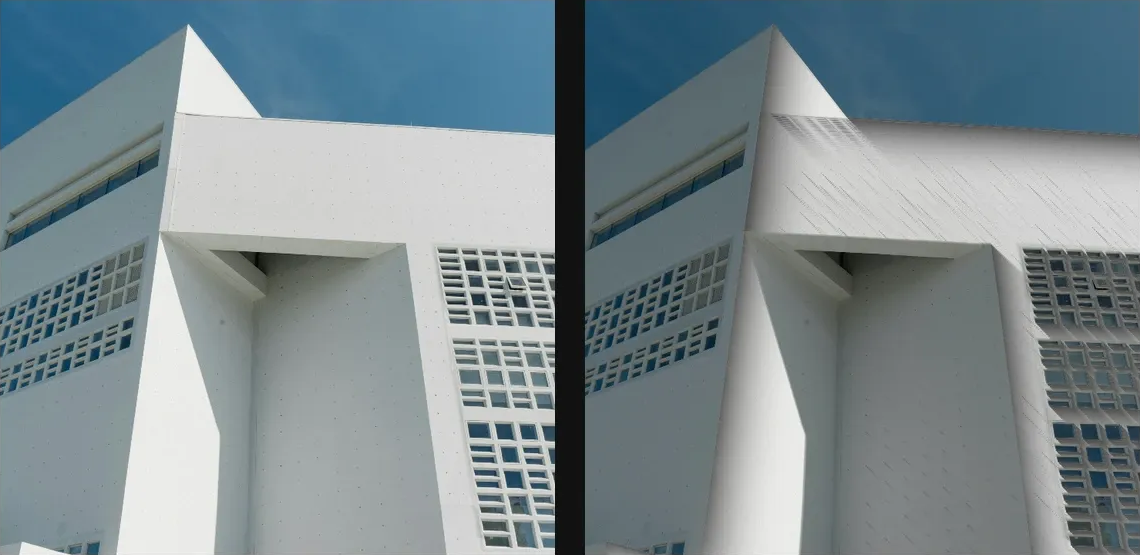
Extrude image alpha or luminance into long directional shadows for graphic depth.
Add Long Shadow
Open an image or build the source composition first. Put this effect after the content it should process in stack processing order. Choose Optics → Light → Long Shadow in the effects picker, or search for Long Shadow with Cmd/Ctrl + F. Select the new layer in Layers to open its Effect Panel.
Choose the caster
Set Threshold to isolate the casting regions. Expand Caster Field when you need another source or want to refine its black and white points.
Project the shadow
Set Angle and Length, then Color, Intensity and Softness. Raise Samples if the projection is visibly stepped and choose Blend for the composite.
Choose the effect field
Open Caster Field and choose Source Alpha, Source Luminance, Layer Mask, Procedural or Image Map as the Source. Refine its range with Black Point, White Point and Invert. Masking explains the shared field sources, procedural shapes and image-map controls.
Compare and finish
Toggle the layer eye to compare with the incoming composition. Use the Effect Panel footer for opacity and blend mode, or add a mask to limit the affected area. In Video or Live, use the function menu on a supported control to add keyframes or a driver.
Control reference
Show individual controls
| Control | What it does | Values and animation |
|---|---|---|
| Caster Field / Black Point | Input level treated as black by the shadow caster field. | 0 to 1 Default: 0 Continuous keyframes |
| Caster Field / Blur Px | Blurs the shadow caster field before it is used, measured in pixels. | 0 to 64 Default: 0 Continuous keyframes |
| Caster Field / Invert | Reverses the black and white values of the shadow caster field. | On / Off Default: On Not keyframeable |
| Caster Field / Source / Kind | Chooses source alpha, source luminance, a layer mask, a procedural shape or an image map for the shadow caster field. | Source Alpha / Source Luminance / Layer Mask / Procedural / Image Map Default: sourceLuminance Not keyframeable |
| Caster Field / White Point | Input level treated as white by the shadow caster field. | 0 to 1 Default: 1 Continuous keyframes |
| Angle | direction the shadow falls across the canvas | 0° to 360° Default: 45° Continuous keyframes |
| Blend | how the shadow is composited back onto the image | Multiply / Normal Default: Multiply Not keyframeable |
| Color | colour of the cast shadow | RGBA colour (0 to 255 per channel) Default: RGBA (0, 0, 0, 255) Colour keyframes |
| Intensity | overall shadow strength | 0% to 200% Default: 65% Continuous keyframes |
| Knee | softens the transition around the casting threshold | 0% to 50% Default: 14% Continuous keyframes |
| Length | how far the cast shadow reaches | 0 to 20 %; 1 to 500 px (typed input: 1 to 2000) Default: 18 % Continuous keyframes |
| Samples | ray quality — higher smooths the shadow at extra cost | 1 to 256 Default: 56 Discrete keyframes |
| Softness | distance falloff — higher gives a longer softer tail | 0% to 100% Default: 55% Continuous keyframes |
| Threshold | how dark a sampled pixel must be before it casts a shadow | 0% to 100% Default: 32% Continuous keyframes |