
Paper Rip
Tear the image with frayed procedural paper edges, fibres, and compressed border shading.
Add Paper Rip
Open an image or build the source composition first. Put this effect after the content it should process in stack processing order. Choose Material → Damage → Paper Rip in the effects picker, or search for Paper Rip with Cmd/Ctrl + F. Select the new layer in Layers to open its Effect Panel.
Place the tear
Set Position and Angle for the cut, then Keep for which side remains visible. Frequency and Jaggedness control the torn edge.
Add fibres and shading
Adjust Micro Jitter, fibre Density and Strand Size, then the edge darkening controls. Relief, Specular and Fold Light Angle give the edge a folded surface appearance.
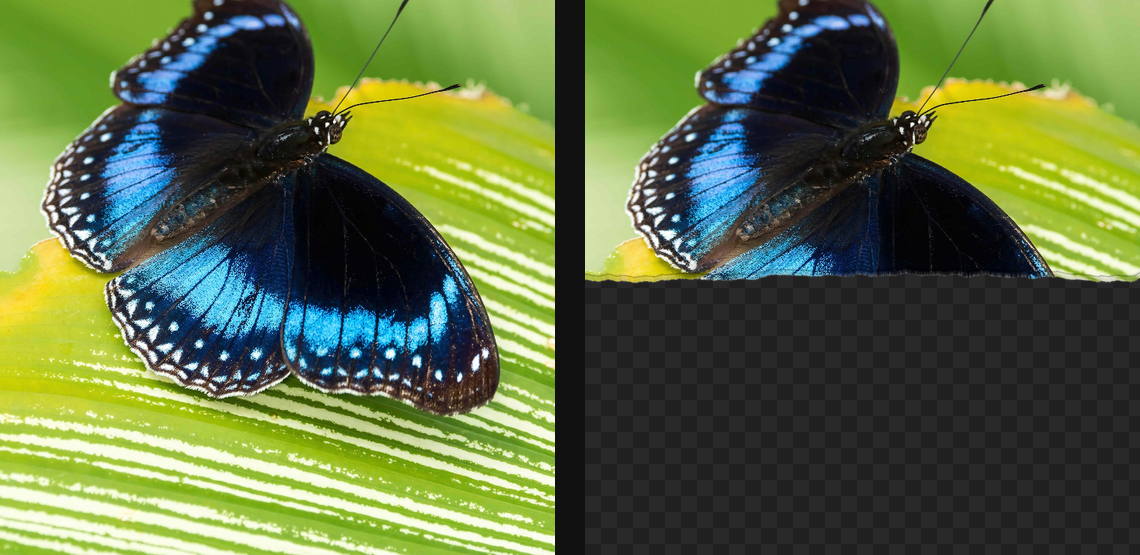
Compare and finish
Toggle the layer eye to compare with the incoming composition. Use the Effect Panel footer for opacity and blend mode, or add a mask to limit the affected area. In Video or Live, use the function menu on a supported control to add keyframes or a driver.
Control reference
Show individual controls
| Control | What it does | Values and animation |
|---|---|---|
| Angle | direction the tear travels | 0° to 360° Default: 0° Continuous keyframes |
| Strength | dark compression just inside the torn edge | 0% to 100% Default: 25% Continuous keyframes |
| Width | width of the compressed-paper band | 0 to 10 %; 1 to 256 px (typed input: 1 to 1000) Default: 0.3 % Continuous keyframes |
| Density | how much white pulp appears at the edge | 0% to 100% Default: 85% Continuous keyframes |
| Strand Size | size of individual fibre strands | 0.05 to 2 Default: 0.35 Continuous keyframes |
| Halo Width | width of the exposed paper-fibre halo | 0 to 10 %; 1 to 256 px (typed input: 1 to 1000) Default: 0.8 % Continuous keyframes |
| Fold Light Angle | direction of the key light over the fold | 0 to 360 Default: 135 Continuous keyframes |
| Relief | height of the virtual curled paper edge | 0 to 1 Default: 0.35 Continuous keyframes |
| Specular | strength of glossy fibre highlights on the fold | 0 to 1 Default: 0.18 Continuous keyframes |
| Frequency | how tightly the tear path wiggles | 0.001 to 0.1 (typed input: 0.001 to 0.2) Default: 0.012 Continuous keyframes |
| Jaggedness | large-scale waviness of the tear path | 0 to 50 %; 0 to 256 px (typed input: 0 to 2000) Default: 1.8 % Continuous keyframes |
| Keep | which side of the tear keeps the image | Above / Below Default: Above Discrete keyframes |
| Micro Jitter | fine edge roughness along the tear | 0 to 50 %; 0 to 256 px (typed input: 0 to 2000) Default: 0.3 % Continuous keyframes |
| Position | where the tear crosses the canvas | 0% to 100% Default: 50% Continuous keyframes |
| Seed | change for a different random pattern | 0 to 9999 Default: 0 Discrete keyframes |